

At a glance
Expert’s Rating
Pros
- Keeps up with everyday operation easily
- Gorgeous display with touch and stylus input
- Speakers pump out ample volume
- Strong wired and wireless connectivity
- Slim and light for a 16-inch laptop
Cons
- Trackpad size leads unintended gestures
- Keyboard is simply so-so
- Webcam could look much better
Our Verdict
The MSI Prestige 16 Flip AI+ is a great laptop with a quality build, zippy speeds in everyday operation, and a wonderful display for work and play. It’s not as fast as some of its competition, but the versatility it offers helps it stand out.
Price When Reviewed
This value will show the geolocated pricing text for product undefined
Best Pricing Today
Price When Reviewed
$2,299
Best Prices Today: MSI Prestige 16 Flip AI+

$2299
MSI’s compelling Prestige 14 Flip AI+ now has a big sibling in the Prestige 16 Flip AI+. This new model boasts a similar design language with a slim and sleek metal frame and a decently low weight for a 16-inch laptop. It runs on the latest Intel Panther Lake hardware with the upgraded Arc B390 graphics.
That combination makes it a serious 2-in-1. It even upgrades a couple of features the 14-inch model missed out on, like a sharper display with a faster refresh rate. The whole package comes together nicely, but some of the typical setbacks of 2-in-1 laptops keep it from being as brilliant as it could have been.
MSI Prestige 16 Flip AI+: Specs and features
- CPU: Intel Core Ultra X9 388H
- Memory: 32GB LPDDR5x-8533
- Graphics/GPU: Intel Arc B390
- Display: 16-inch 2880×1800 OLED touchscreen, 120Hz, VESA DisplayHDR True Black 600
- Storage: 1TB PCIe 4.0 SSD – Micron 2500
- Webcam: 1080p + IR
- Connectivity: 2x Thunderbolt 4 / USB-C with Power Delivery and DisplayPort Alternate Mode, 2x USB 3.2 Gen 1, 1x HDMI 2.1, 1x 3.5mm combo audio
- Networking: WiFi 7, Bluetooth 6
- Biometrics: Windows Hello fingerprint, facial recognition
- Battery capacity: 78.6 watt-hours
- Dimensions: 14.08 x 10.01 x 0.55 inches
- Weight: 3.64 pounds
- MSRP: $2,299 as-tested ($1,369 base)
MSI offers just a few configurations of the MSI Prestige 16 Flip AI+. Our test unit is at the top of the stack, costing $2,299 and featuring the specifications above. The display is common among all of the configurations, so you don’t have to worry about missing out on it if you pick a lower-end config. Storage and memory are also identical across the board. That said, MSI doesn’t give much reason to choose a lower-end config.
You can drop down to a config with an Intel Core Ultra X7 358H, but otherwise identical specs and save $100. MSI’s cheapest option is $2,149 and it downgrades the CPU to an Intel Core Ultra 7 355 with Intel Graphics with just four Xe cores rather than Intel Arc Graphics included on the other configurations — enough to make this a horrible option next to the other two.
MSI is offering non-flipping models through Costco. These get the Intel Core Ultra X7 358H chip and should cost $1,369. They still support the Nano Pen, but don’t include it. Unfortunately, planned pricing and actual pricing may diverge for the non-flipping model. The model specified for Costco appears to have a $1,799 price tag instead of the $1,369 (we were told). Pricing for the flipping models appear accurate with B&H’s listing showing prices that match those shared by MSI.
If you’re looking for a creativity and productivity machine, the MSI Prestige 16 Flip AI+ is a great choice.
MSI Prestige 16 Flip AI+: Design and build quality
Foundry / Mark Knapp
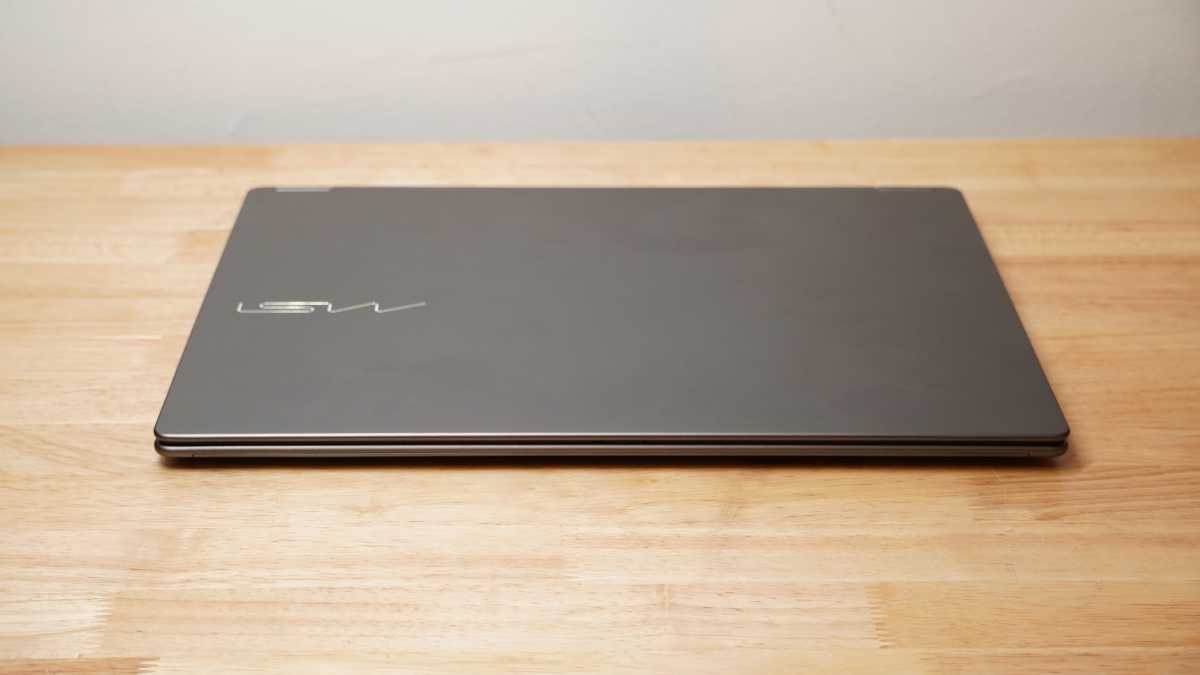
Having already tested the MSI Prestige 14 Flip AI+, I wasn’t too surprised to see the MSI Prestige 16 Flip AI+ was very much the same laptop made larger. It’s ultimately a large but slim slip of metal. In this case, it’s 14.08 inches wide and 10.01 inches deep, but it’s the same 0.55 inches thick that the smaller model is. This all puts it at a tame 3.64 pounds, which is great considering all that the system is packing.
The laptop sits on slim rubber feet, making it easy to slip into laptop sleeves and backpacks. The smooth, rounded edges all around also help in that department. They also help with comfort when resting my wrists on the front edge while typing or holding the system flipped all the way open as a tablet.
The large size of the system leads to some deck flex, though it’s not extreme. While resting my hands on the keyboard deck to type, I don’t notice the flex. For such a large screen, flex is minimal. The display has a fairly large chin and top bezel. That’s not uncommon for 2-in-1s, but the 1-inch chin still leaves it feeling a little dated.
While the looks of the system are clean, especially with the silvery engraved MSI logo on the lid, they’re also fairly plain. MSI didn’t use the extra size of the keyboard deck to accommodate a larger keyboard or fit top-firing speakers. It just becomes a larger slab of empty space. Like on the 14-incher, the stereo speakers remain on the bottom.
The MSI Prestige 16 Flip AI+ draws fresh air in through a modest grille on the bottom and vents it out through a slim exhaust in the back. The underside also houses the MSI Nano Pen. The holding mechanism is a little awkward to insert the pen into, as orientation is important. The mechanism also can spring the pen out if you don’t have a hand ready to catch it.
MSI Prestige 16 Flip AI+: Keyboard, trackpad
Foundry / Mark Knapp
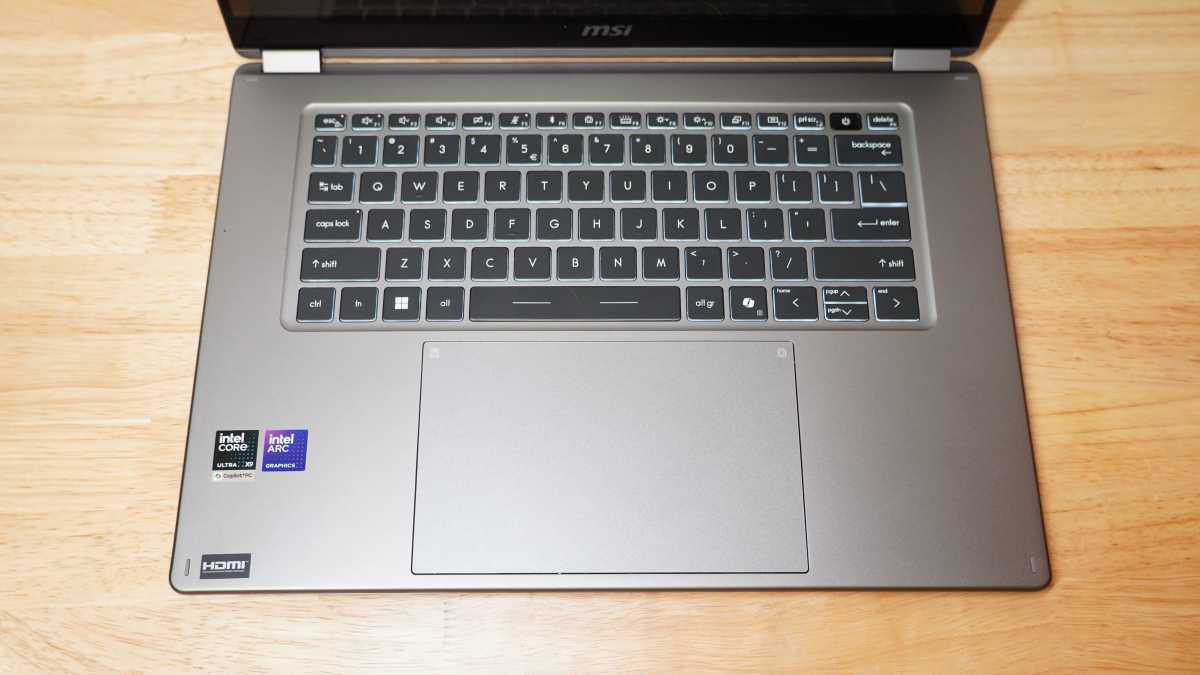
The keyboard holds the MSI Prestige 16 Flip AI+ back somewhat. Its keys don’t have enough of a contour to easily feel centered on, aren’t stable enough to feel firmly planted on, and don’t have a consistent tactility to provide confident typing. It’s all just a few degrees in the wrong direction, so while not egregiously bad, it’s not quite good.
I was just able to break a 100-word-per-minute typing speed with a modest 97 percent accuracy in Monkeytype, but I struggled to go any faster without missing a bunch of keys. I also had to tap harder than usual, adopting an unusually strong fingerstrike to manage that typing accuracy.
The massive trackpad is great for swiping around and navigating. It has plenty of room for multi-finger gestures and it can offer special control zones, such as scrolling along the edges to adjust volume and brightness or double-tapping in corners to open shortcuts. The trackpad is a little too easy to accidentally get a palm on sometimes. It’s not that it has bad palm rejection while typing so much as that it can register the palm as another finger while simply navigating with the mouse. In this way, I will be moving the mouse and suddenly end up scrolling, or I’ll be scrolling and accidentally open Task View or minimize all my windows.
One behavior of the system I expected to blame on the trackpad was the frequent launching of Copilot. I thought there might be some trackpad shortcut that was launching it without my knowing. I was ultimately able to determine that there wasn’t (though it is possible to create one through MSI Center S), and yet it continued to launch on its own from time to time even with my hands well away from the Copilot key on the keyboard. This mystery remains unsolved.
MSI Prestige 16 Flip AI+: Display, audio
Foundry / Mark Knapp
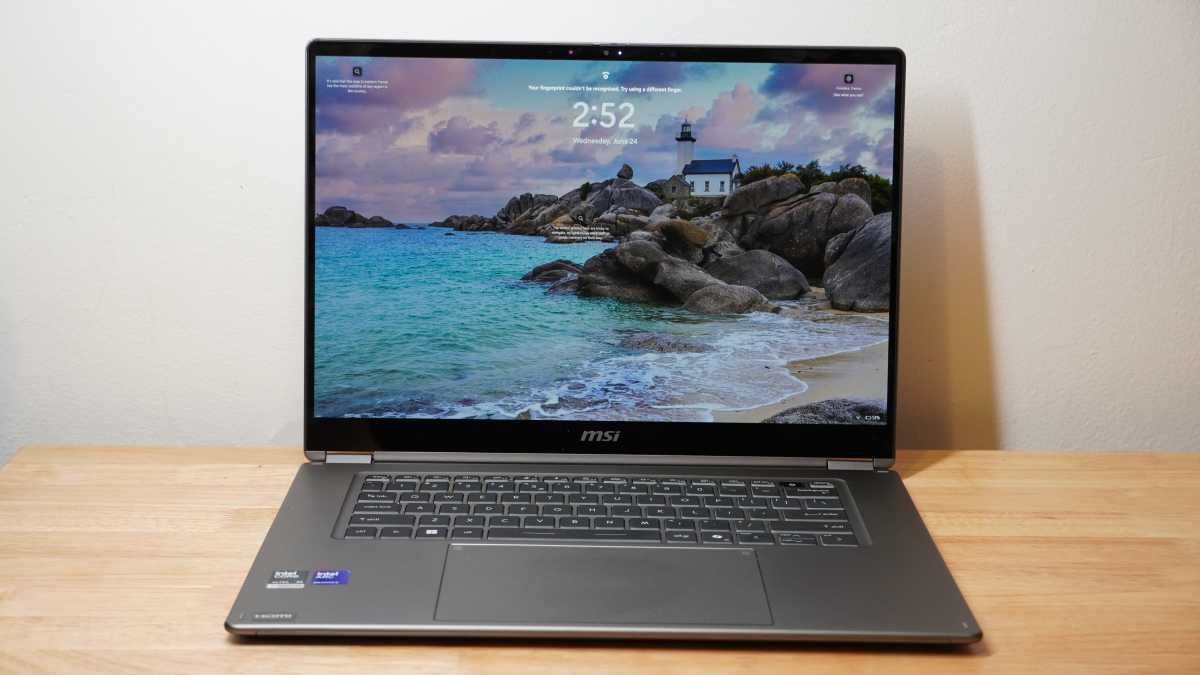
The MSI Prestige 16 Flip AI+ has a simply stunning display. Its 16-inch panel offers a crisp 2880×1800 resolution combined with a 120Hz refresh rate for sharp and smooth visuals. It has a glossy coating that can struggle a bit with glare, but usually that glare is easy to overcome with the display’s 393 nits of brightness. That brightness can go even further in HDR, where I measured it at 640 nits for a 10 percent window and 661 nits for a brief 100 percent window. That’s matched with perfect black levels from OLED, so you get rich and poignant visuals for games and movies. The color is also on point, reaching 100 percent of the sRGB color space, 99 percent of the DCI-P3 color space, and doing so accurately with a max dE1976 of 1.95. This all makes the display one that’s brilliant for creative work and play alike.
It is also a touchscreen and it has a pen digitizer. You can really go hands-on with the screen to use it how you like. The digitizer is visible as a series of tiny dots on the display, but I’ve found I could only spot them on bright, single-color sections of the screen when I sit unreasonably close to the screen. The stylus is a very thin one, and it’s slippery on the glass surface of the display, so heavy stylus users may not love the feel, but I found it good for notating a document, drawing up a quick blueprint of a project, or signing a document.
The MSI Prestige 16 Flip AI+ includes four speakers, each delivering up to two watts. This lets that laptop offer considerable volume, which is easily enough to play over its quiet fans. The woofer-tweeter pairing helps provide low-end and crisp treble, though deep bass and sub-bass don’t come through, and you can’t expect any rumble. Still, it sounds very good for a thin laptop.
MSI Prestige 16 Flip AI+: Webcam, microphone, biometrics
The webcam on the MSI Prestige 16 Flip AI+ is not all that impressive. It seems to struggle a bit with high dynamic range situations with any details in shadow appearing blurry and hazy. Unfortunately, this meant that, because my face was a little shaded despite being in a well-lit room, the clarity suffered.
The webcam has a fairly wide viewing angle which does help when using Windows Hello facial recognition. Whereas on some laptops I have to hunch down to get in front of the camera before it will recognize my face, the MSI Prestige 16 Flip AI+ tends to do it quickly without much effort on my part. The MSI Prestige 16 Flip AI+ also includes a fingerprint reader near the top-right corner of the keyboard. In testing, it was quick and consistent.
The microphones perform a little better than the camera. They captured my voice whether I was standing right in front of the laptop or walking around the room, and successfully canceled out background noise at the same time.
MSI Prestige 16 Flip AI+: Connectivity
Foundry / Mark Knapp
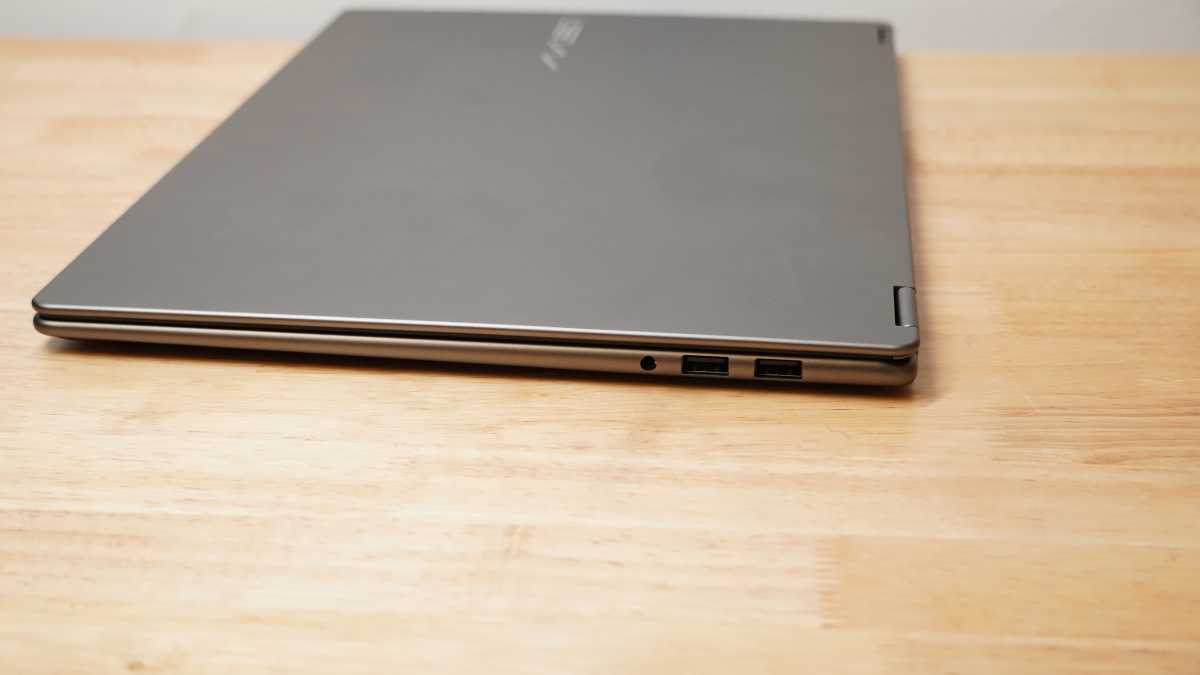
Connectivity is a strong front for the MSI Prestige 16 Flip AI+. It offers both fast and capable wired and wireless connections. The left edge of the laptop includes a pair of Thunderbolt 4 ports that can handle just about anything you need, including DisplayPort output and power input. They sit next to an HDMI 2.1 port for high-res video output. The right edge includes two 5Gbps USB-A ports and a headset jack. An SD card reader would have rounded out things nicely, but there isn’t one.
For wireless, the MSI Prestige 16 Flip AI+ supports Wi-Fi 7 and has proven fast and stable in testing. Its Bluetooth 6.0 connection has also been dependable.
MSI Prestige 16 Flip AI+: Performance
The MSI Prestige 16 Flip AI+ runs on some of the more promising laptop hardware available to thin-and-light machines with its Intel Core Ultra X9 388H, 32GB of memory, and Intel Arc B390 graphics. But MSI’s performance tuning seems to be more focused on efficiency and cool, quiet operation than sheer performance. Even when running full-bore in its Performance mode, it doesn’t prove very loud or shrill. By default, it runs in Balanced mode, which is even quieter and still modestly performant.
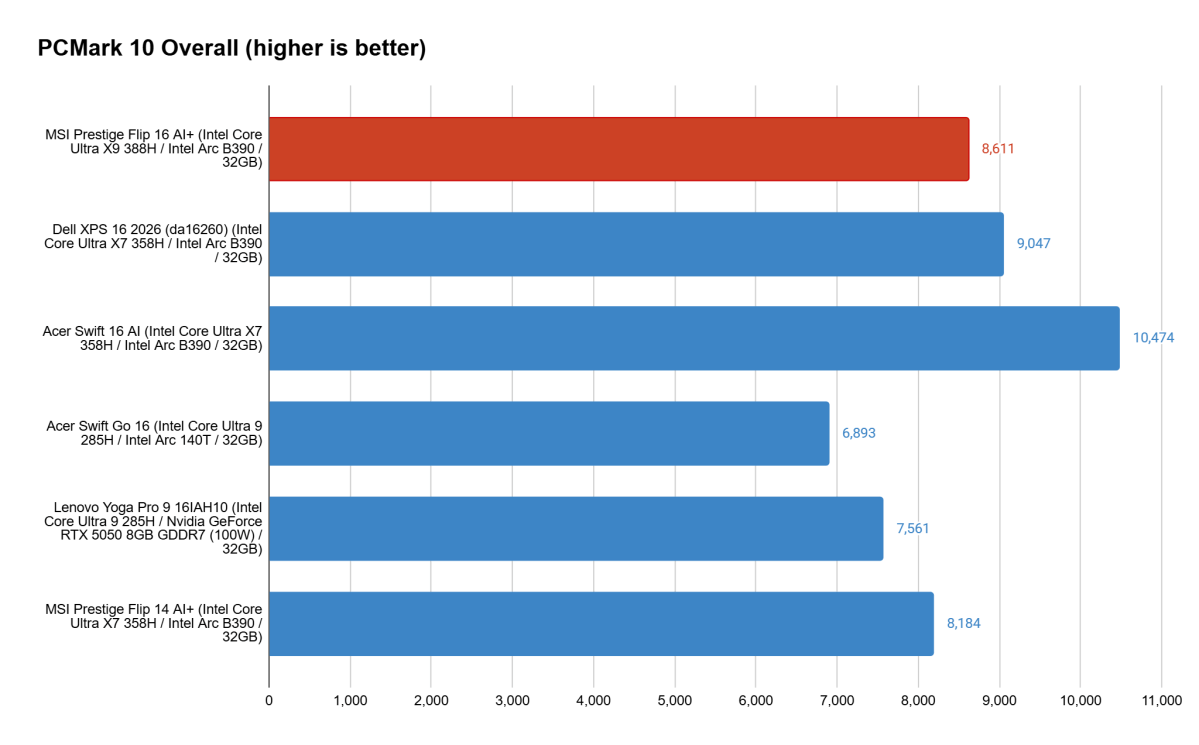
The MSI Prestige 16 Flip AI+ is more than up to the task of everyday office operation. It performed exceptionally well in PCMark 10’s holistic office test, which shows it clearly can handle web browsing, video conferencing, document drafting, spreadsheets, and even some light photo and video editing. It held up well to my own office workload, which entails piles of Chrome tabs that are frequently flipped through for research and drafting.
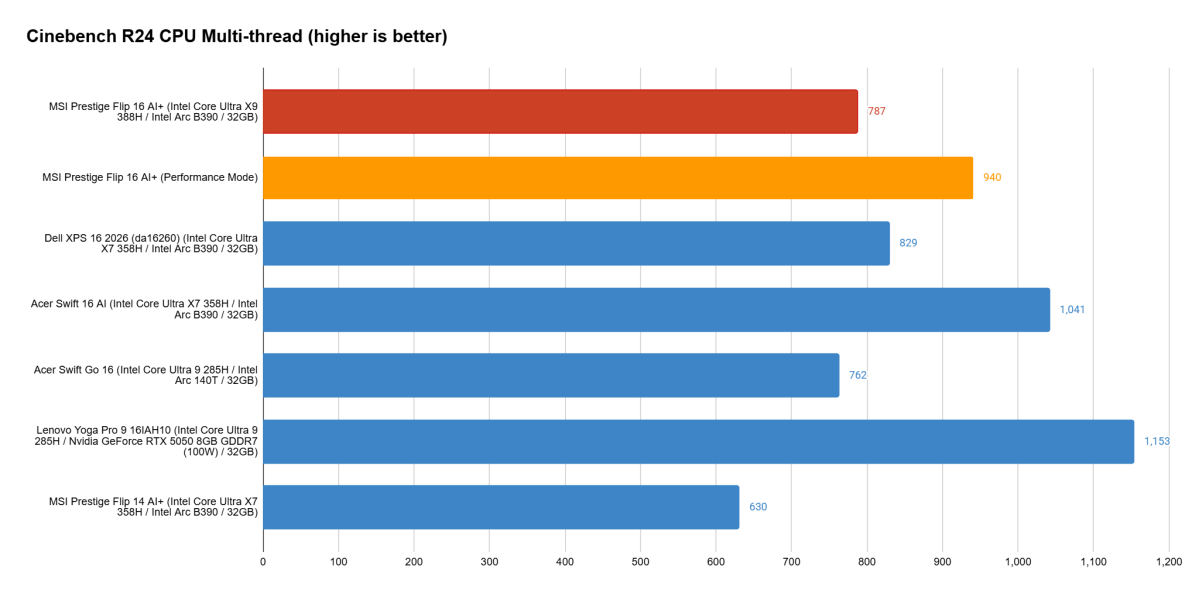
When it comes to raw CPU performance, the MSI Prestige 16 Flip AI+ is good, but not making the most of its hardware. In its default Balanced power mode, it offers strong single-core and multi-core performance, but it doesn’t quite get ahead of similarly equipped devices like the Dell XPS 16 or Acer Swift 16 AI.
Dialing up to Performance mode may help in short bursts, but even then, it doesn’t catch up with the Acer Swift 16 AI, which also ran in Performance mode. And though it passes the Dell XPS 16, the Dell can also jump up in Performance mode to reclaim its lead (995 points in Cinebench R24 Multi-thread). Even the small MSI Prestige 14 Flip AI+ can keep up, attaining a comparable 942 points when switched to Performance mode. Surprisingly, none of those systems keep up with the Lenovo Yoga Pro 9 16IAH10 running an earlier Intel Core Ultra 9 285H. That system highlights the benefits of extra cooling, though weighs a heftier 4.52 pounds as a result.
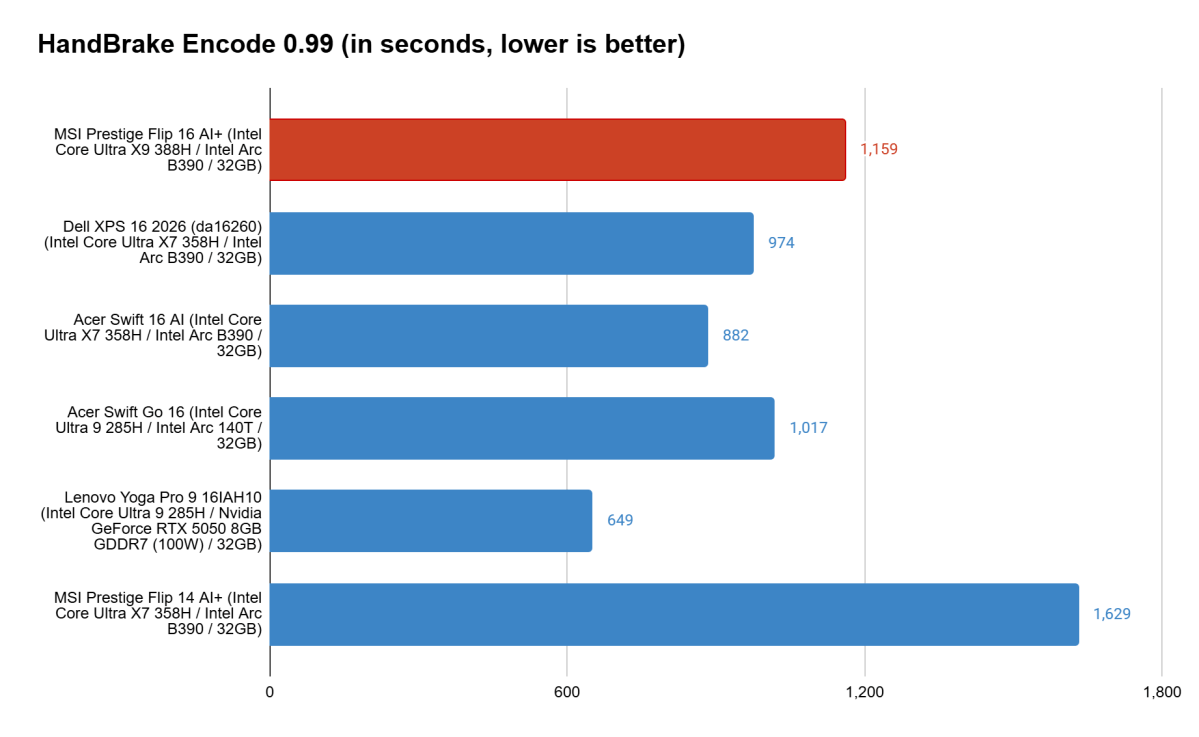
Handbrake helps highlight the MSI Prestige 16 Flip AI+’s modest cooling. The test requires the system to render a large video file to a new resolution. This hits the CPU hard and generates a lot of heat over the course of the test, ultimately seeing just how well the CPU can sustain performance.
The MSI Prestige 16 Flip AI+ took the longest of the bunch aside from its smaller sibling, which predictably had an even harder time wrangling the heat. Lenovo’s system provides an example of how much quicker strong cooling can make a task like this, almost halving MSI’s time. The MSI Prestige 16 Flip AI+ might have been able to come closer to the XPS 16’s time if it swapped to Performance mode, but the XPS 16 managed its score in Balanced mode, as did the Acer Swift Go 16.
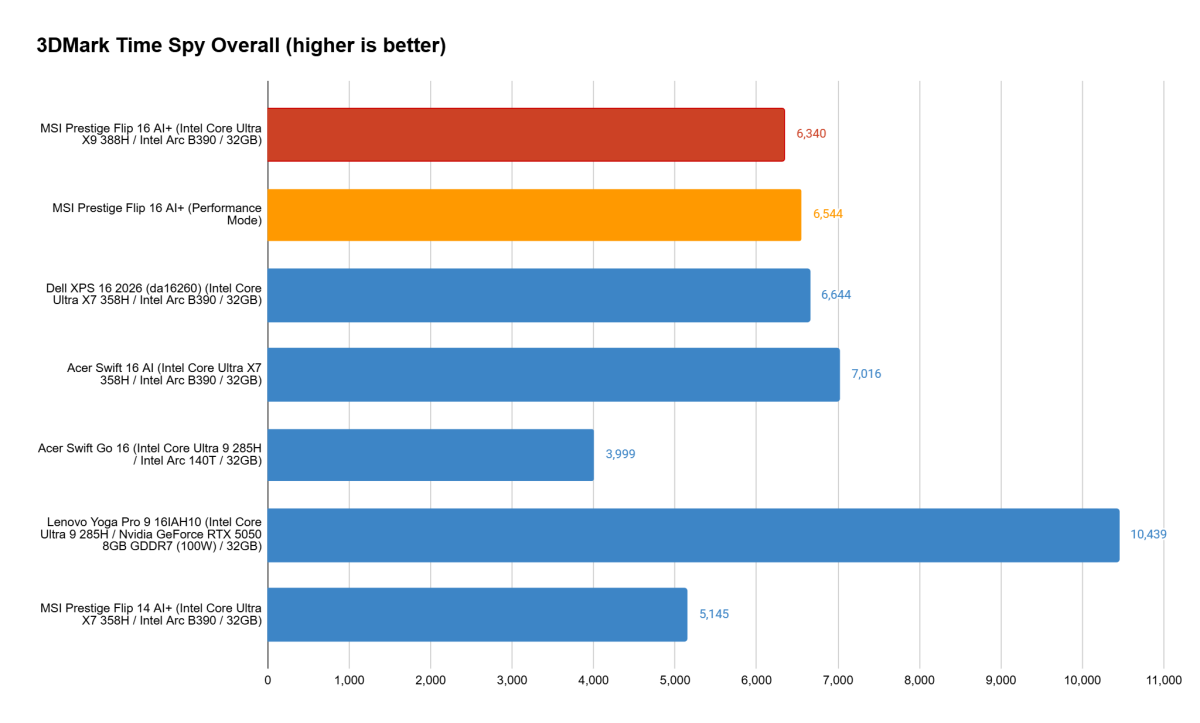
The Arc B390 graphics in the MSI Prestige 16 Flip AI+ hold up well, at least. The MSI Prestige 16 Flip AI+ performed close to the XPS 16 and Acer Swift 16 here, showing a clear jump up from the Arc 140T and other earlier Intel integrated graphics options. It still doesn’t quite keep up with even low-end discrete graphics like the RTX 5050 in the Lenovo Yoga Pro 9 16IAH10, but it’s also more efficient and doesn’t come with the weight penalty of discrete graphics like that.
The brief performance demands of 3DMark’s Time Spy benchmark as seen above don’t paint the full picture, though. In repeated testing, the heat that built up would see performance sink rather quickly. The system couldn’t manage the same scores during a 20-run stress test. While the MSI Prestige 16 Flip AI+ should still be good for some light gaming, more demanding games will likely see framerates dip after just a couple minutes.
MSI Prestige 16 Flip AI+: Battery life
The MSI Prestige 16 Flip AI+ has the strong battery life that recent Intel laptops have been impressing with. The longevity is somewhat tempered by the large screen, so the MSI Prestige 16 Flip AI+ didn’t break through to the incredible 34.5-hour mark of its smaller sibling, but it still did well. In our offline video playback test, with the display running at 250 nits and headphones connected, the MSI Prestige 16 Flip AI+ ran for just 11 minutes shy of 20 hours. This is a strong result even though it’s not setting any records.
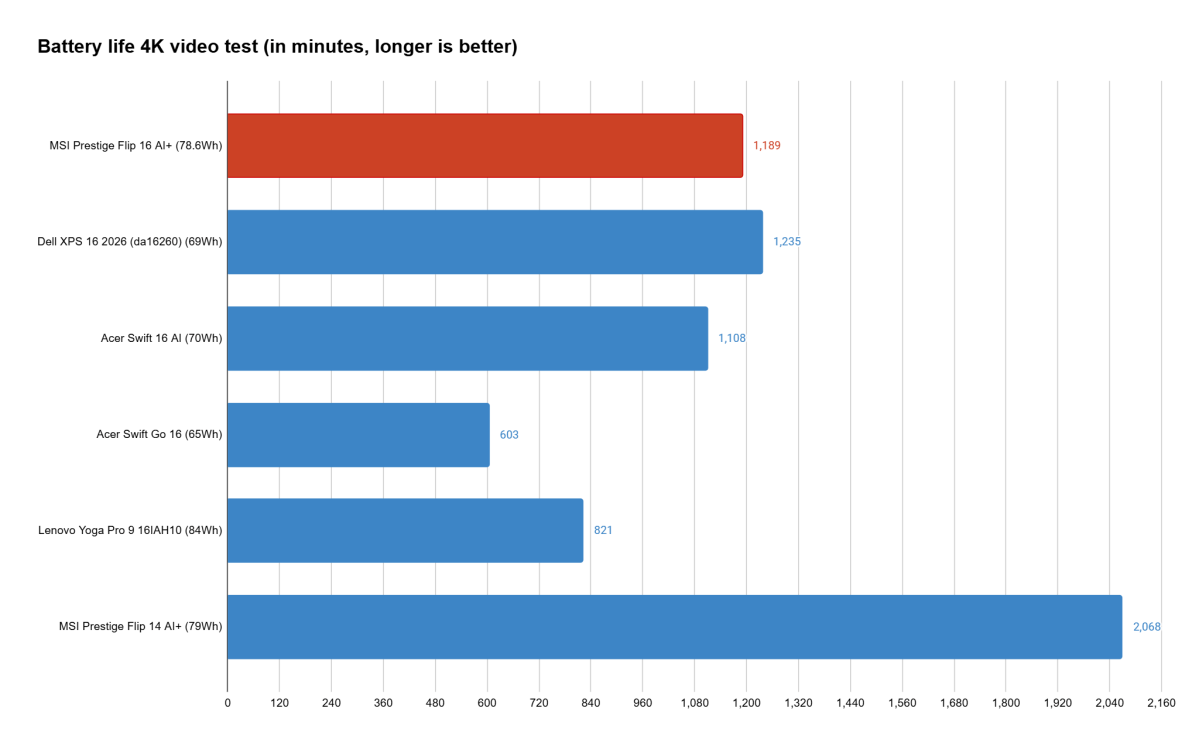
In regular use, the battery life is considerably shorter. With Wi-Fi running and a good pile of tabs open in Chrome, the system generally gives me about 10 hours of runtime keeping that same 250-nit brightness. That’s been enough to make it through my workdays comfortably without worrying about the battery giving out too soon. Unfortunately, that 20-hour mark hasn’t proven attainable for actual work.
MSI Prestige 16 Flip AI+: Conclusion
The MSI Prestige 16 Flip AI+ isn’t perfect, but has plenty going for it. Its sleek and lightweight design for a 16-incher has appeal for portable productivity. The display is gorgeous and just as good for consuming content as it is for creating it. The machine also offers flexibility with its 2-in-1 design, which many of its competitors won’t match.
While performance leaves something to be desired next to similarly configured rivals, there’s more than enough zip for everyday operation. The MSI Prestige 16 Flip AI+ is simply more of a short sprinter. If you’re looking for a creativity and productivity machine, the MSI Prestige 16 Flip AI+ is a great choice. Be sure to check out the far cheaper 14-inch model if size isn’t a major concern.