


At a glance
Expert’s Rating
Pros
- Attractive design
- Excellent performance in all areas
- Enjoyable keyboard with good key feel
- Large and responsive touchpad
- Attractive OLED touchscreen
- Competitive pricing given RAM, storage provided
Cons
- Not as thin as the specifications indicate
- Lots of modern connectivity, but no USB-A or dedicated video-out
Our Verdict
The HP Omnibook Ultra 14 is a luxurious portable laptop that provides solid portability alongside surprisingly excellent performance.
Price When Reviewed
This value will show the geolocated pricing text for product undefined
Best Pricing Today
Price When Reviewed
$3,049.99
Best Prices Today: HP OmniBook Ultra 14

$1399.99
For a time, it seemed as though the Windows world was going to have to admit defeat at the hands of Apple’s almighty silicon. Apple M-series chips are shockingly efficient, which tends to give MacBooks an edge in portability and performance in thin, light laptops.
However, new Windows laptops with Intel Core Ultra Series 3 chips are starting to claw back territory, and the HP OmniBook Ultra 14 represents the best the Windows world has to offer in this form factor. It’s portable, yet fast—and it looks great, too.
HP OmniBook Ultra 14: Specs and features as-tested
HP sent me an OmniBook Ultra 14 with serious hardware inside. This includes Intel’s top-shelf Core Ultra X9 388H Series 3 processor, which includes Intel Arc B390 graphics. The laptop also had 64GB of speedy LPDDR5x-9600 memory and a 2TB solid state drive. As you might know, RAM and storage are expensive right now, so these additions drive the price up to $3,049.99.
- CPU: Intel Core Ultra X9 388H Series 3
- Memory: 64GB LPDDR5x-9600
- Graphics/GPU: Intel Arc B390
- NPU: Intel AI NPU 50 TOPS
- Display: 14-inch OLED 2880×1800 120Hz touchscreen
- Storage: 2TB PCIe Gen 4.0 NVMe M.2 SSD
- Webcam and microphone: 5MP IR webcam, dual-array microphone
- Connectivity: 3x Thunderbolt 4 (USB-C, DisplayPort, Power Delivery 3.1), 1x 3.5mm combo audio jack
- Networking: Wi-Fi 7, Bluetooth 6.0
- Biometrics: Windows Hello facial recognition
- Audio: Quad-speaker sound system
- Battery capacity: 70-watt-hours
- Dimensions: 12.25 x 8.49 x 0.42 inches (stated) or 0.65 inches (measured)
- Weight: 2.82 pounds
- Operating System: Windows 11 Home
- Price: $3,049.99 MSRP as configured
While the model I reviewed rang up at $3,049.99, that’s largely due to the amount of RAM and storage it provides. Entry-level models with an Intel Core Ultra 7 356H start at $1,699.99, and a model with Core Ultra X9 388H, but just 32GB of RAM and 1TB of storage, is available at Best Buy for $2,199.99.
The HP OmniBook Ultra 14 is a great laptop and an obvious go-to if you want a portable laptop that also delivers serious performance.
HP OmniBook Ultra 14: Design and build quality
Foundry / Matthew Smith
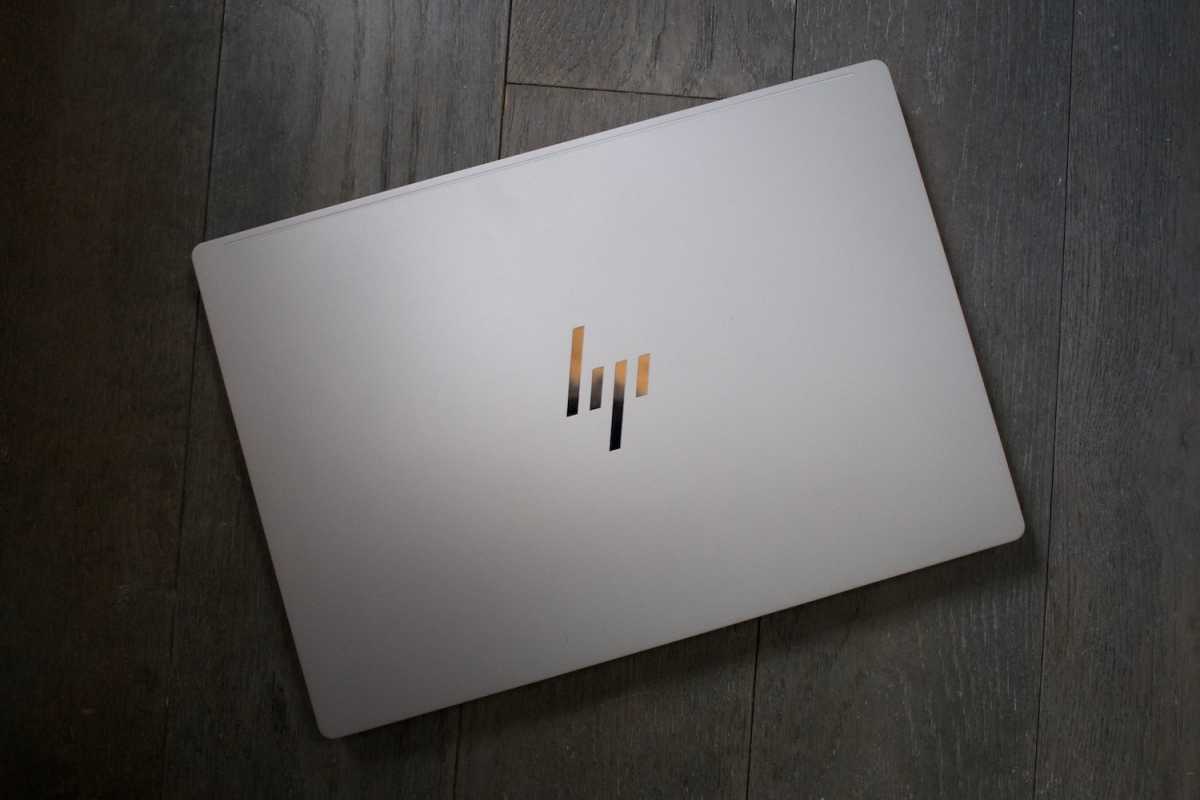
As the “Ultra” in the HP OmniBook Ultra 14’s name implies, this is a premium laptop that sits high in HP’s product stack, and the design conveys this well. The laptop has a three-piece metal construction with forged stamped panels that give the laptop’s metal body a complicated and pleasing shape, particularly on the bottom panel.
Though the laptop is mostly metal, it includes rubber feet to keep it stable on slick surfaces and provide extra grip when you pick the laptop up. The overall build quality is excellent with minimal flex across all surfaces. I particularly like the hinge, which is precisely tuned. The laptop is easy to open with one hand, or even one finger, yet the lid doesn’t hang open when the laptop is stored in a bag.
HP offers the laptop in three colorways: Eclipse Gray, Stone Blue, and Silk Sand (which I received). It’s nice to have some choice, and all of the colorways look great. However, the colorways are tied to specific hardware configurations. The Intel variant I reviewed can be purchased in Eclipse Gray and Silk Sand, while the Qualcomm model is only available in Stone Blue. So if you want Intel, but also like blue, you’re out of luck.
The OmniBook Ultra 14’s specifications say the laptop is about 0.42 inches (or 10.7 millimeters) thick, though HP’s measurements are creative. This figure doesn’t measure the laptop’s full thickness but instead omits the feet. Placed on a desk, with the lid closed, the laptop’s profile is less impressive at about 0.65 inches (or roughly 16.5 millimeters). That’s thin, but not remarkably so, and I don’t think the laptop feels unusually thin when held. It’s indisputably light, though, at 2.82 pounds.
HP OmniBook Ultra 14: Keyboard, touchpad
Foundry / Matthew Smith
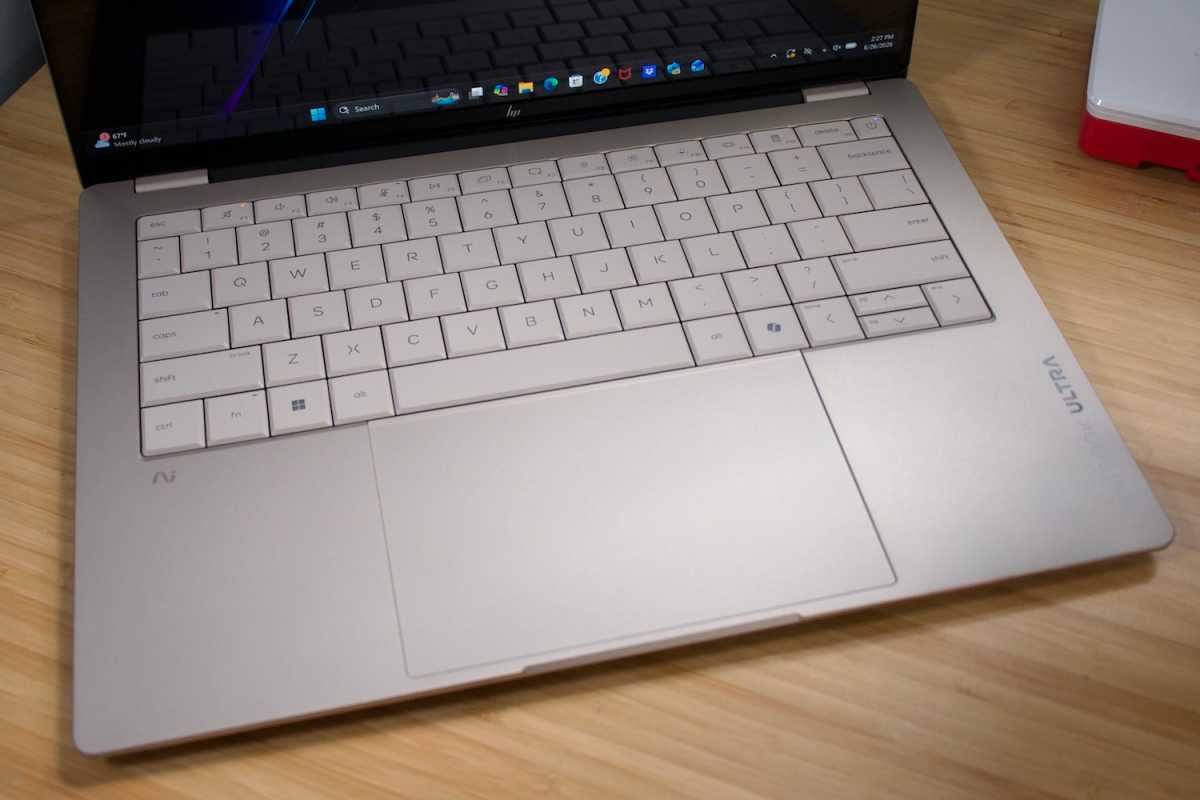
HP really nails the keyboard on the HP OmniBook Ultra 14. It has a spacious layout with large keys and ample palm rests. Better still, the keys provide a lot of key travel and are well tuned. They have a springy and precise feel with a firm, definitive bottoming action. It’s definitely among the better laptop keyboards I’ve used in 2026.
Unfortunately, the keyboard backlight is rather bad. It offers just two brightness settings, and the highest setting isn’t that bright, which means you can’t see the keys lit up if you’re in a bright room. Some might argue that doesn’t matter but I think a keyboard backlight is both a functional and ornamental feature. To make matters worse, the backlight’s LEDs look splotchy and uneven.
The haptic touchpad returns the HP OmniBook Ultra 14 to leadership. It offers a large, responsive surface that measures about 5.5 inches wide and 3.5 inches deep. The touchpad also benefits from a smooth, luxurious surface that provides the right amount of friction, as well as subtle haptic feedback.
HP OmniBook Ultra 14: Display
Foundry / Matthew Smith
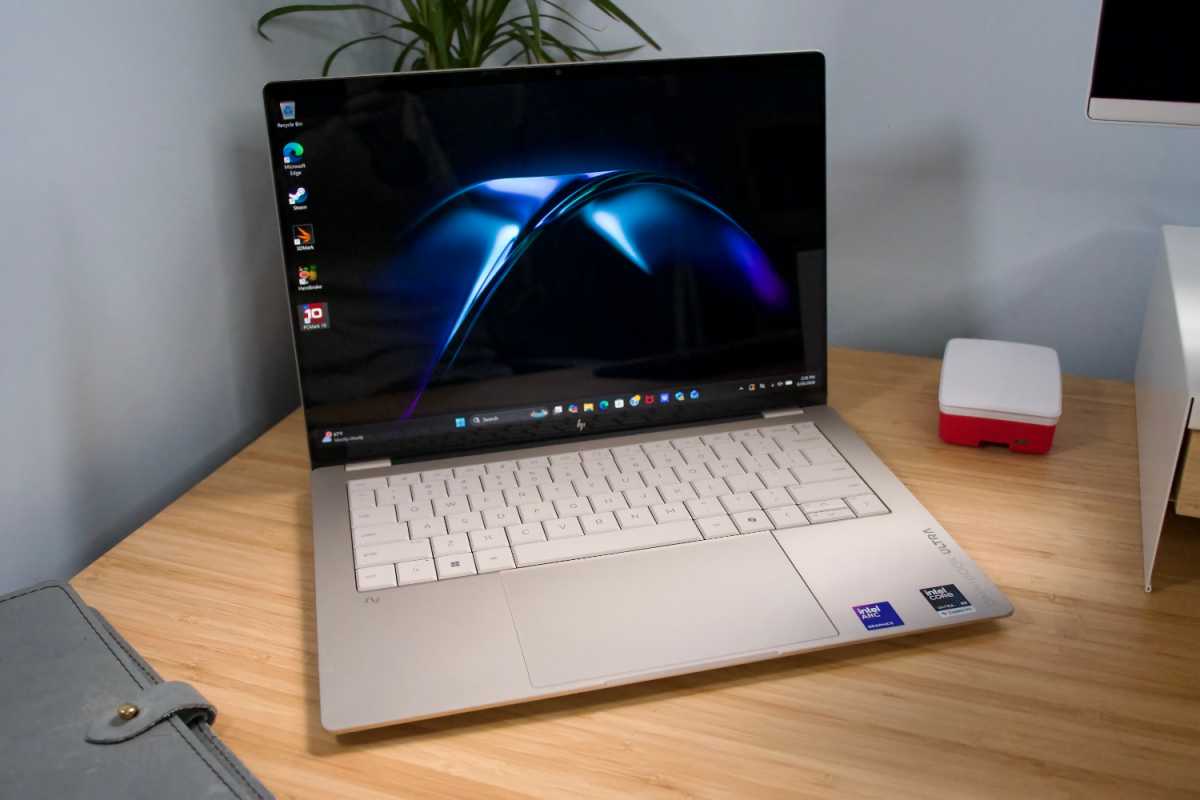
Most HP OmniBook Ultra 14 configurations, including the one I reviewed, ship with a 14-inch 2880×1800 OLED touchscreen. The sole exception is an entry-level Snapdragon model with a 1920×1200 OLED touchscreen.
The 2880×1800 OLED touchscreen is a real treat. It supports HDR, has an SDR brightness up to 500 nits, and provides a vivid color gamut with great color accuracy. The display boasts VESA Display HDR True Black 600 and Calman Verified certifications. Also, like virtually all OLED displays, it has outstanding contrast and deep, inky black levels. It’s even a high-refresh display with a maximum refresh rate of 120Hz.
I have just one nitpick: the display is very glossy. Reflections can be an issue in bright rooms even at high levels of display brightness. However, most laptop OLED displays share this downside, so it doesn’t put the HP at a disadvantage against its competitors.
HP OmniBook Ultra 14: Audio
HP’s marketing doesn’t say that much about audio performance, which is usually a bad sign. I was pleasantly surprised, then, when the HP OmniBook Ultra 14 delivered punchy audio with a high maximum volume and clear presentation. There is a hint of oomph to bass, yet the high and mid-range aren’t overwhelmed.
HP OmniBook Ultra 14: Webcam, microphone, biometrics
HP ships the OmniBook Ultra 14 with a solid 5MP webcam that can provide resolutions up to 1440p at 30 frames per second. It looks sharp and captures good color, though the default field of view is too wide for my tastes. The laptop also provides an IR camera for use with Windows Hello facial recognition log-in, which is easy to set up and responsive. A physical privacy shutter rounds out the camera features.
A dual-microphone array is provided, too, and it’s fairly typical. Audio capture is clear and loud but sounds hollow and thin, at least when compared to most stand-alone microphones. Still, the audio quality is fine for most video conferencing.
HP OmniBook Ultra 14: Connectivity
Foundry / Matthew Smith
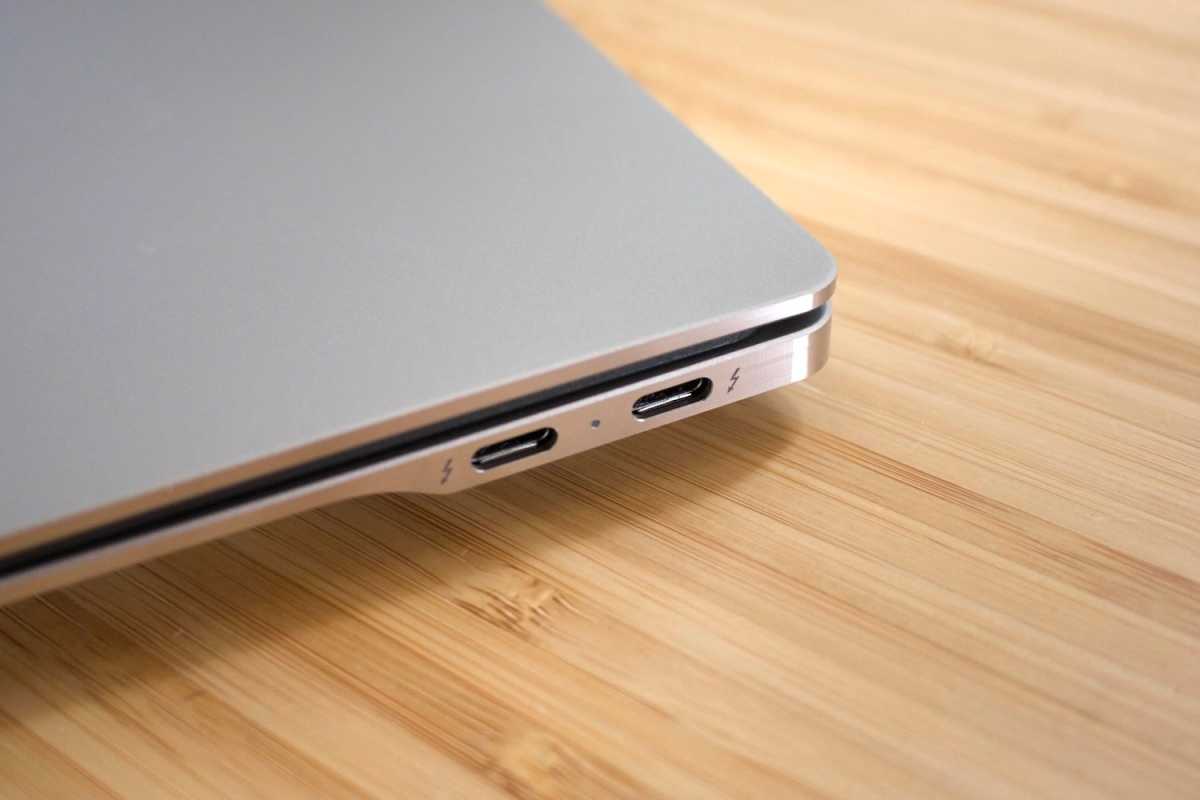
The HP OmniBook Ultra 14 is all in on modern connectivity, for better and for worse.
It has three Thunderbolt 4 ports, all of which support Power Delivery, DisplayPort, and up to 40Gbps of data. There are a few competitors, like high-end Dell XPS 14 configurations, which can match the HP OmniBook Ultra 14. However, most Windows laptops have just one or two Thunderbolt ports, if they have any at all.
The trio of Thunderbolt 4 ports are joined by just one other port—a 3.5mm audio jack. The OmniBook Ultra 14 doesn’t have USB-A, Ethernet, or an SD card reader. Most people will need a Thunderbolt or USB-C dock, or at least a few adapters, to connect all of their peripherals.
Whether this is an advantage or disadvantage depends entirely on the devices you use. Many people have converted entirely to USB-C and Thunderbolt, in which case the OmniBook Ultra 14’s connectivity will be a perk. But if you still use some older devices, or need an SD card reader, this might not cut the mustard.
The laptop’s wireless connectivity is also modern. It supports Wi-Fi 7 and Bluetooth 6.0. I would expect this, given the laptop’s price, but it’s good to see HP didn’t cut these corners.
HP OmniBook Ultra 14: Performance
The HP OmniBook Ultra 14 I reviewed was configured with Intel’s Core Ultra X9 388H Series 3. This is the best of Intel’s Core Ultra Series 3 line-up with 16 cores (four performance, eight efficient, and four low-power efficient cores) and a maximum Turbo frequency of 5.1 GHz. It also has Intel’s Arc B390 integrated graphics with 12 Xe cores and a maximum graphics frequency of 2.5 GHz.
Foundry / Matthew Smith
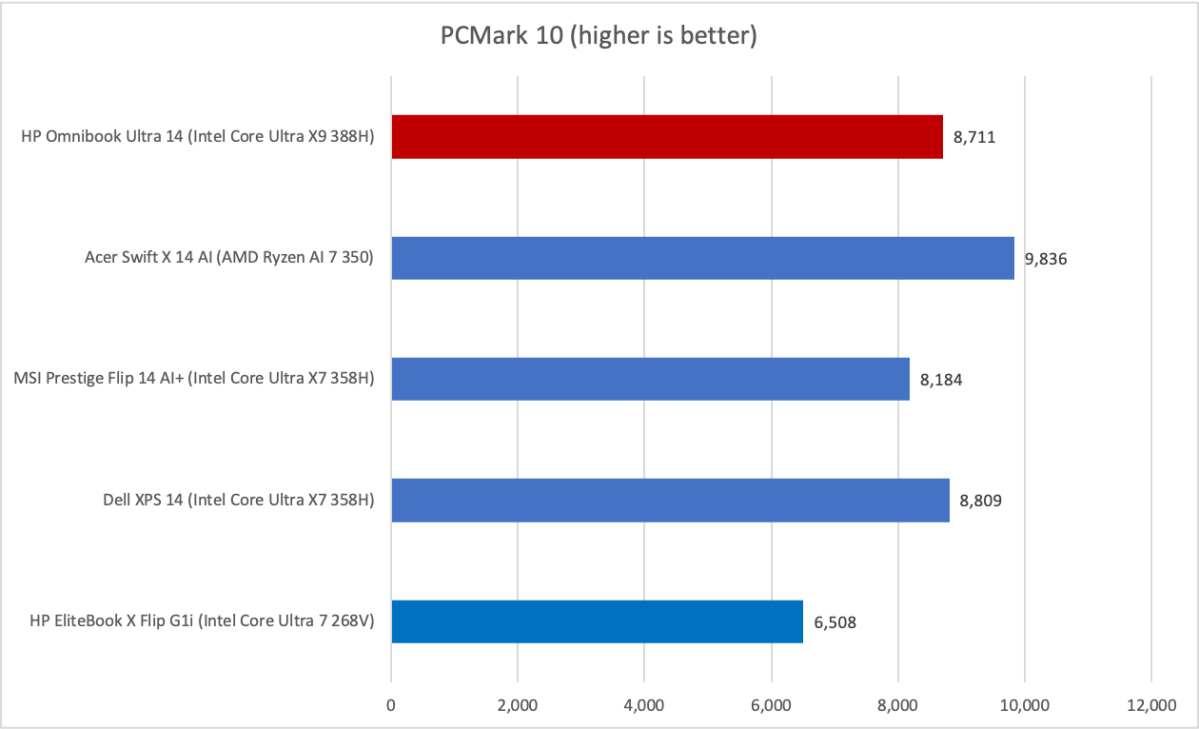
PCMark 10 is a holistic benchmark that depends on CPU, GPU, memory, and storage performance. As the graph shows, the OmniBook Ultra 14 is well equipped to deliver in this benchmark, as it has speedy hardware across the range (for a thin-and-light 14-inch laptop, at least). While the fast CPU offers obvious grunt, I’d say the RAM configuration also lends some assistance here. The OmniBook Ultra 14 has a lot, and the RAM is speedy LPDDR5X-9600.
Foundry / Matthew Smith
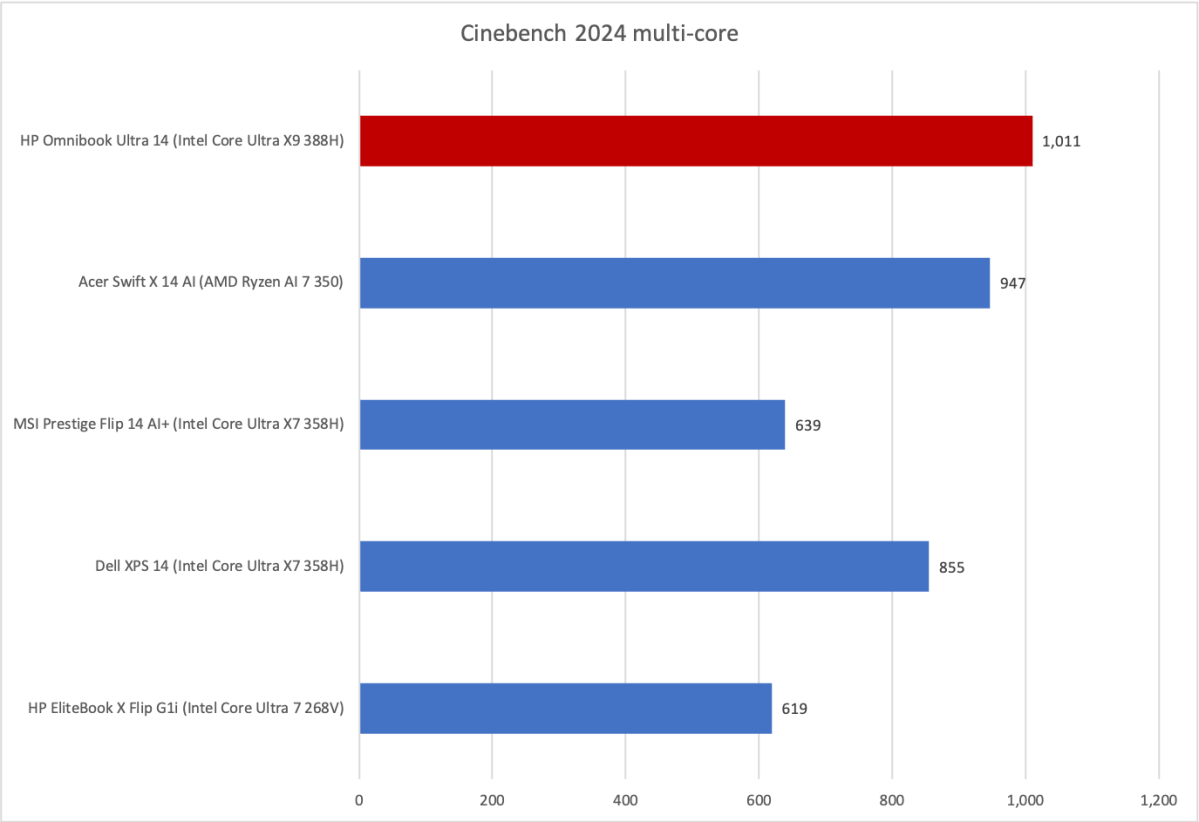
Cinebench is a long-running industry standard benchmark that is heavily multi-threaded and tends to make good use of all cores. That is good news for the HP OmniBook Ultra 14 and Intel Core Ultra X9 388H Series 3, as the CPU has 16 cores in total, made up of three different core types. The OmniBook Ultra 14 ends up ahead of all the tested alternatives in this benchmark.
Foundry / Matthew Smith
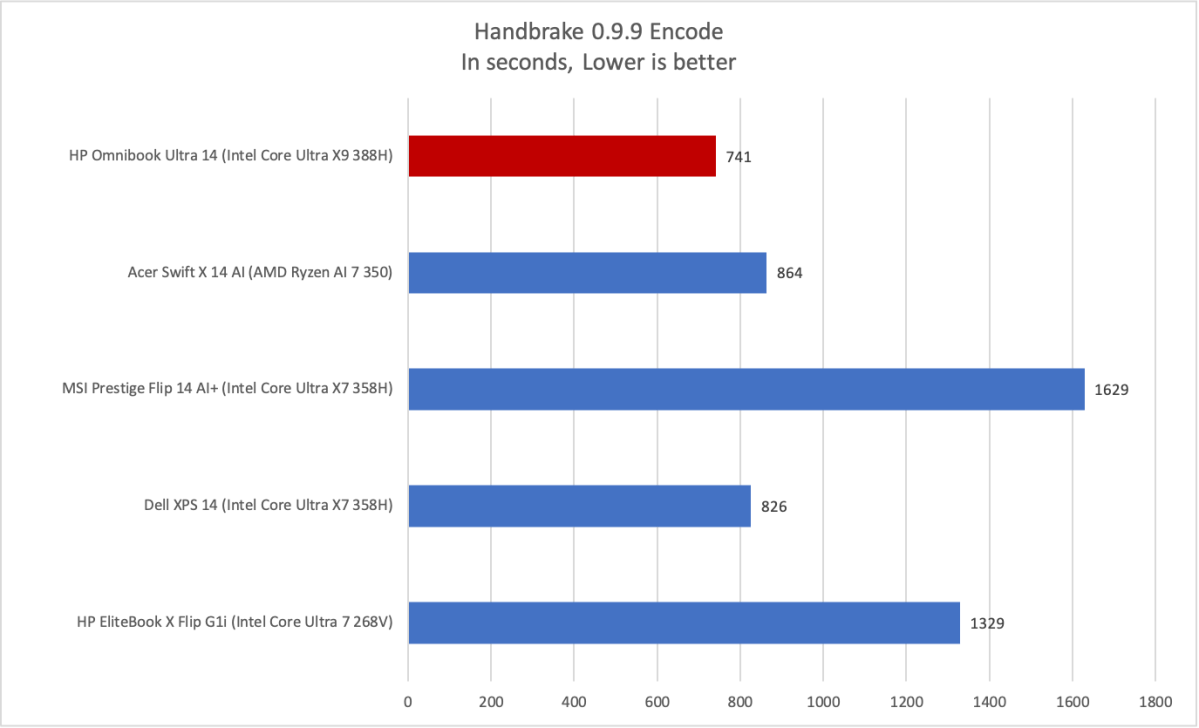
Handbrake 0.9.9 is an older version of the benchmark. Though it’s a multi-core benchmark, it tends to be less efficient in how it uses cores than Cinebench. However, that isn’t a problem for the Core Ultra X9 388H, which powers the OmniBook Ultra 14 to another leading result. This appears to show the strength of Intel’s performance cores.
Foundry / Matthew Smith
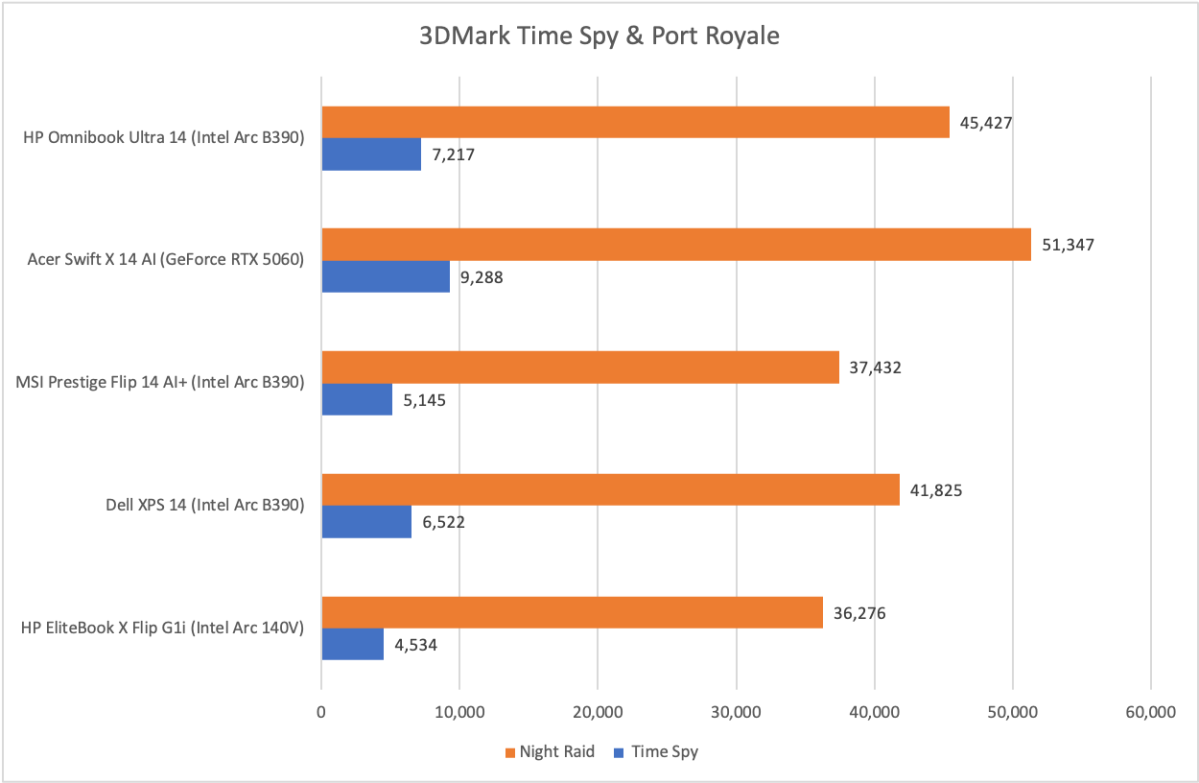
Now we move on to 3D performance. HP’s OmniBook Ultra 14 relies on Intel integrated graphics—the Arc B390, to be specific.
A few years ago that would’ve been bad news. Not today. As the graph shows, the OmniBook Ultra 14 with Arc B390 delivers stunning performance for integrated graphics. It outpaces other systems with integrated graphics and even comes close to the GeForce RTX 5060—though Arc B390 is still 15 percent to 25 percent slower, which is a meaningful difference.
Ultimately, performance is a victory for the HP OmniBook Ultra 14. The Core Ultra X9 388H clearly has the goods, both in CPU and GPU tests, and the OmniBook Ultra 14 provides enough power and cooling to allow the chip to strut its stuff.
On that note, I’ll add that despite its performance the OmniBook Ultra 14’s cooling system isn’t particularly loud. It’s audible, to be sure, and may still be annoying if you’re sensitive to fan noise. But it’s quieter than a typical thin-and-light with Nvidia GeForce RTX 5050 or RTX 5060 graphics.
HP OmniBook Ultra 14: Battery life and portability
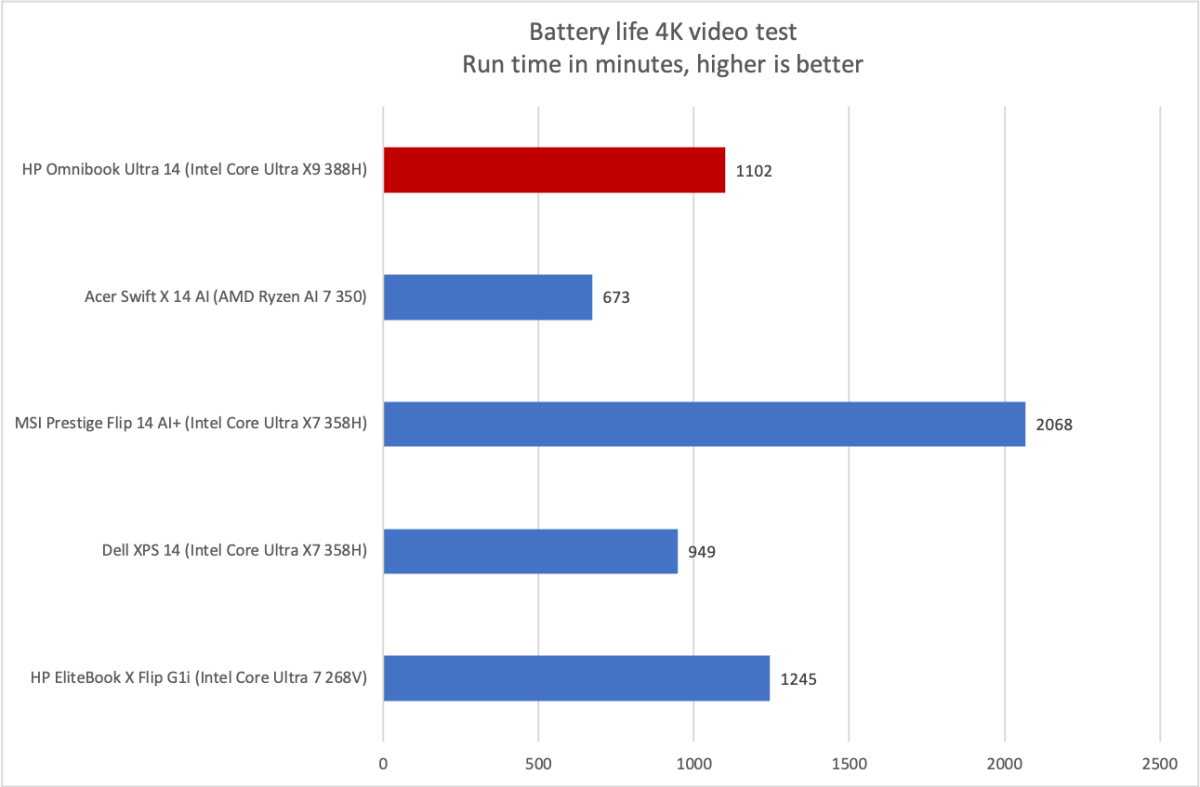
The HP OmniBook Ultra 14 ships with a 70-watt-hour battery. That is a typical size for a battery in a 14-inch laptop, and it leads to typical, though perhaps slightly above average, battery life results.
Foundry / Matthew Smith
I saw over 18 hours of battery life in the standard battery test, which loops a 4K file of the short film Tears of Steel. As the graph shows, there are some laptops that can endure longer, such as the MSI Prestige Flip 14 AI+. However, the OmniBook Ultra 14 still provides quite a bit of endurance, and it lasted longer than some key alternatives, such as the Dell XPS 14.
As an added bonus, HP ships the OmniBook Ultra 14 with a tiny 65-watt GaN power adapter. It’s about an inch wide and tall and two inches deep—nearly half the size of the already small adapters that ship with most Asus, Dell, and Lenovo laptops.
HP OmniBook Ultra 14: Conclusion
The HP OmniBook Ultra 14 is a great laptop and an obvious go-to if you want a portable laptop that also delivers serious performance. Relative to its competitors, such as the Dell XPS 14, Prestige Flip 14 AI+, and the Acer Swift X 14 AI, the OmniBook Ultra takes a clear lead (though I will note the Dell XPS 14 is also now available with the Core Ultra X9 388H, which may upgrade its performance to compete with the OmniBook Ultra).
I also think the OmniBook Ultra 14 is competitively priced given the hardware on offer. Remember, this machine has 64GB of RAM and 2TB of solid state storage. A glance at Newegg or Best Buy will quickly reveal that an MSRP of $3,049.99 is towards the low end of what laptops with this much RAM and storage sell for today.
In short, the OmniBook Ultra 14 is luxurious, performs well, and delivers good value for money. What more could you want?