

At a glance
Expert’s Rating
Pros
- 40Gbps performance
- Easy installation and swapping of NVMe SSDs
- Handsome design
Cons
- Runs very warm under heavy loads, despite active cooling
Our Verdict
Asus’s PA40SU is a good-looking 40Gbps enclosure with on-par performance and exceptionally easy, tool-less SSD installation. Our only caveat is that it runs quite warm despite an internal fan.
Price When Reviewed
This value will show the geolocated pricing text for product undefined
Best Pricing Today
Price When Reviewed
$120
Best Prices Today: Asus ProArt PA40SU USB4 NVMe enclosure

$99.99

$102.99
Asus’s ProArt PA40SU is one of the easiest USB4 NVMe enclosures we’ve tested, with a sleek metal design and competitive 40Gbps performance. But despite its built-in fan, it can still get uncomfortably warm under sustained transfers.
Read on to learn more, then see our roundup of the best external drives for comparison.
What are the Asus PA40SU’s features?
The PA40SU is a handsome, mostly metal black rectangle measuring approximately 4.75 inches long, by 1.8 inches wide, by 0.6 inches thick. Weight is around 4.7 ounces with an SSD inside. It’s svelte indeed for a 40Gbps SSD enclosure — witness the large fins and bulk of the competing OWC 1M2 and TerraMaster D1 Plus.
The enclosure is slotted on both sides to facilitate air flow, and is actively cooled by a fan at the non-port end. The fan is the reason it’s not as bulky as the aforementioned competition. The NVMe bridge/controller chip is an ASMedia ASM2464PD, and no AC adapter is required — the PA40SU runs solely off of bus power as all single-SSD enclosures do.
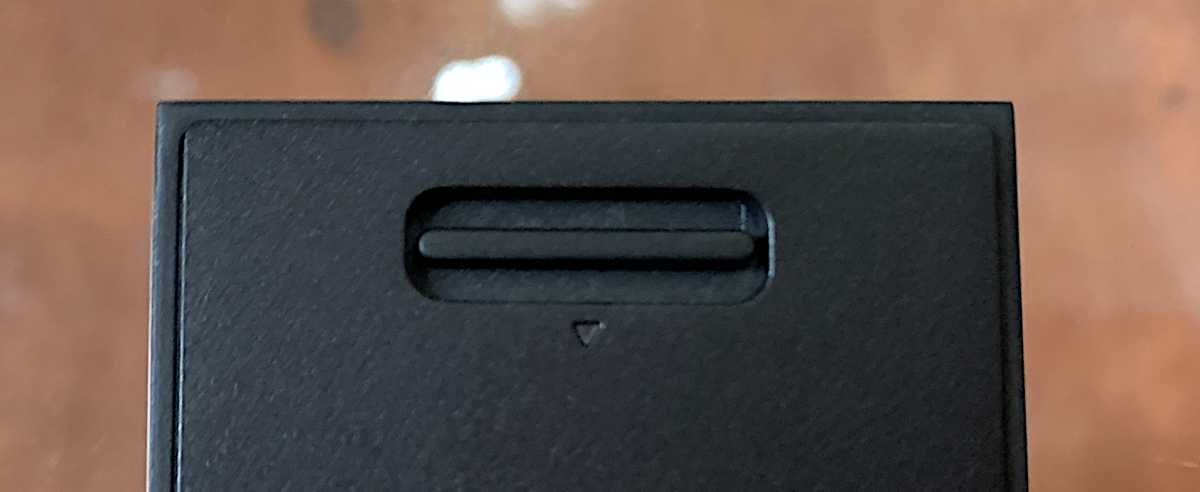
The PA40SU’s neatest trick is that it is completely tool-less. You can access the drive bay by sliding a wide latch on the backplate, and the retaining mechanism for the NVMe SSD is a simple plastic clip that swivels to lock and unlock.
The retaining clip can be moved to a second location to accommodate 2230 form factor drives. Slide it into the larger part of the keyhole, remove it, and reverse the process in the keyhole closest to the M.2 slot.
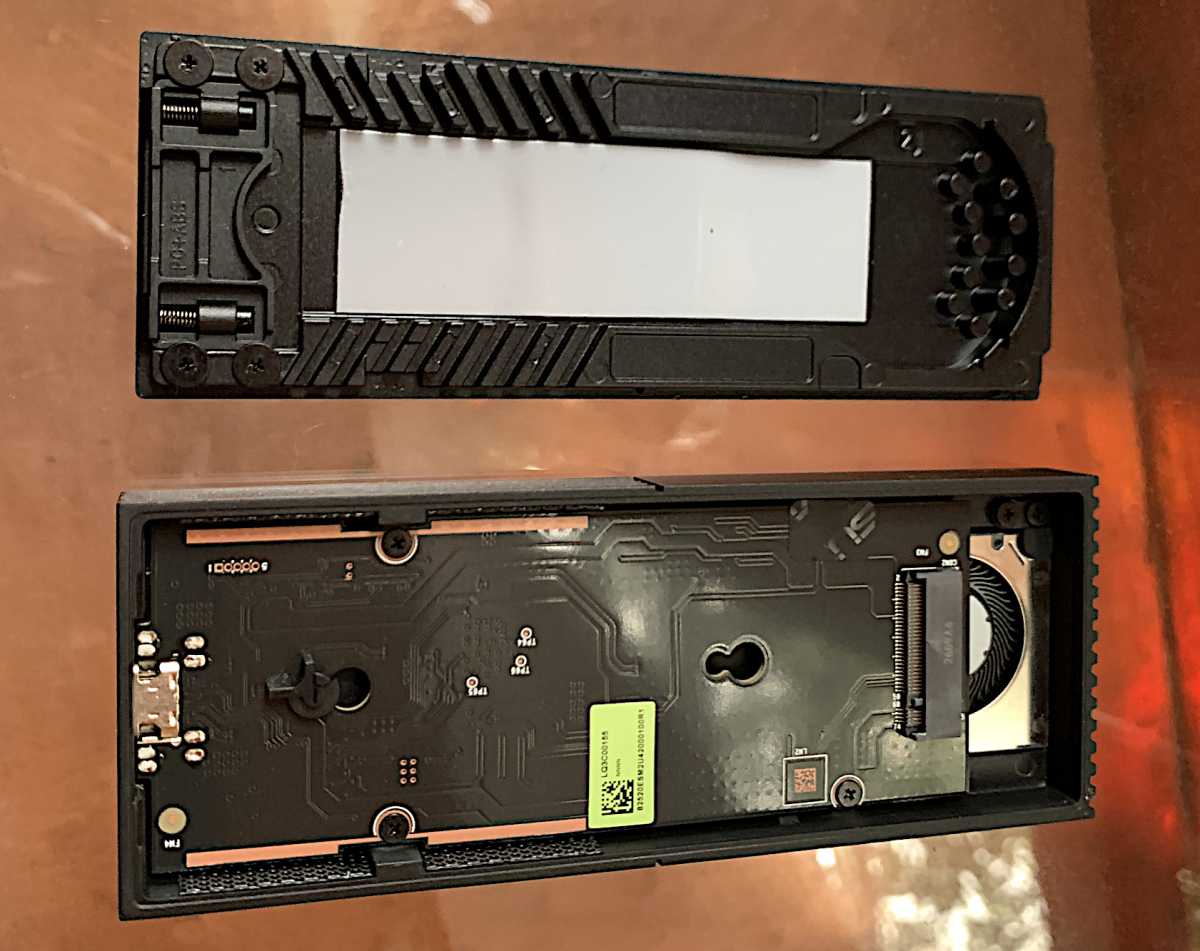
Shown below is the beefy backplate release switch in all its glory. Despite being easy to open, I never got the impression that the unit might come apart accidentally. You can see the sturdy spring mechanisms that gave me that feeling in the image above (upper left).
As mentioned, the PA40SU is a USB4 40Gbps enclosure that can accept both 2280 (22mm wide, 80mm long) and 2230 (30mm long) SSDs in its single M.2 slot. There’s a single Type-C port on one end with a tiny power/activity light immediately to its right. I mentioned it’s a looker, right?
How much is the Asus PA40SU?
The PA40SU was retailing on Amazon for $120 at the time of this writing. That’s roughly the going rate for a 40Gbps enclosure at the moment, though some that have been around longer might offer better discounts. Alas, the one-year warranty is a bit disappointing. I was expecting at least two years at this price point.
How fast is the PA40SU?
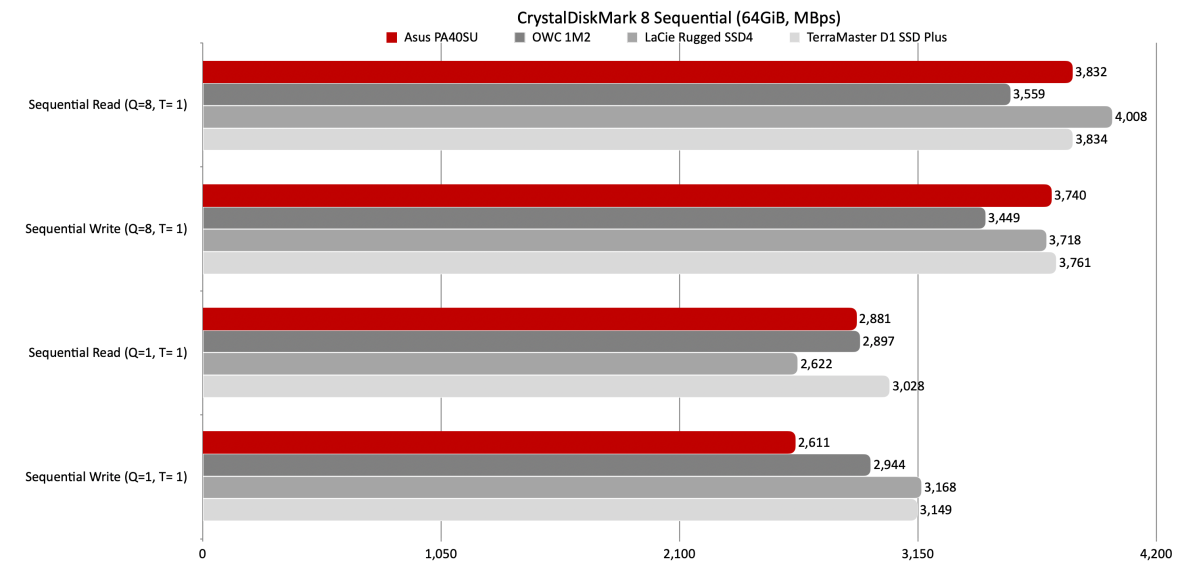
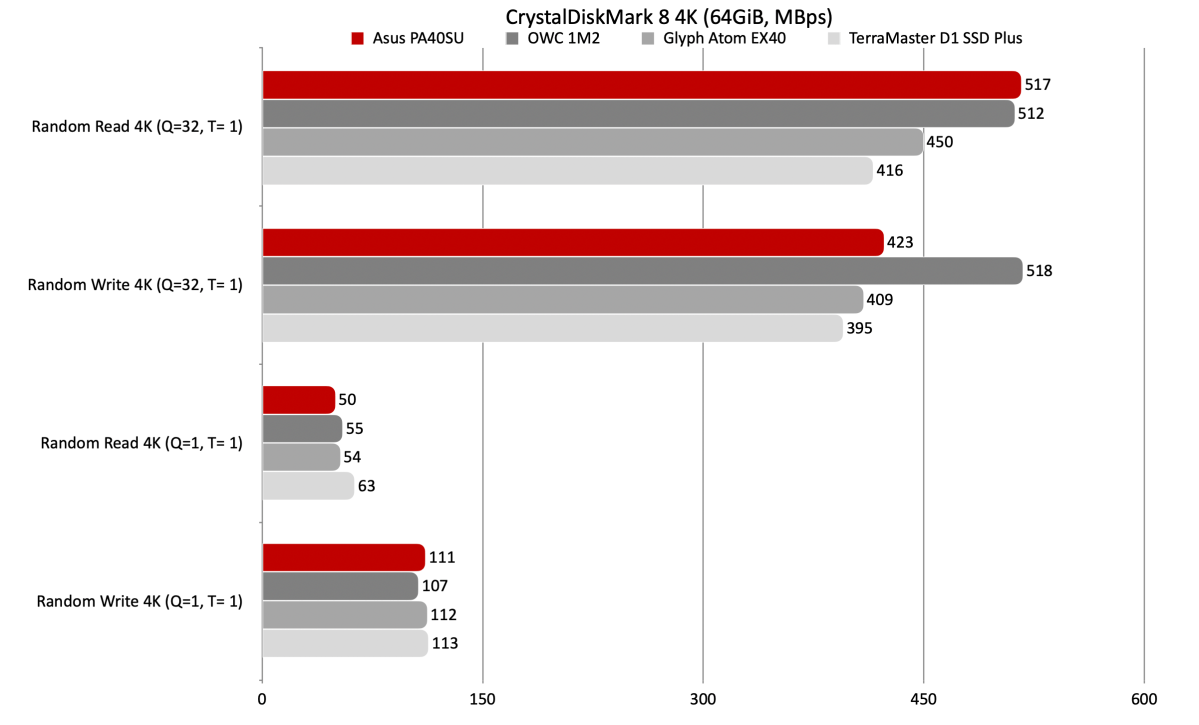
While not the fastest 40Gbps NVMe enclosure we’ve tested, the PA40SU was competitive with its OWC 1M2, LaCie Rugged SSD4, and TerraMaster D1 SSD Plus competitors in nearly all respects. In other words, it’s fast, though better on synthetic benchmarks than with real-world transfers.
As you can see below, the PA40SU turned in a good CrystalDiskMark 8 sequential throughput performance, though it didn’t top the charts in any particular test.
It was the same neck-and-neck story with CrystalDiskMark 8’s 4K tests.
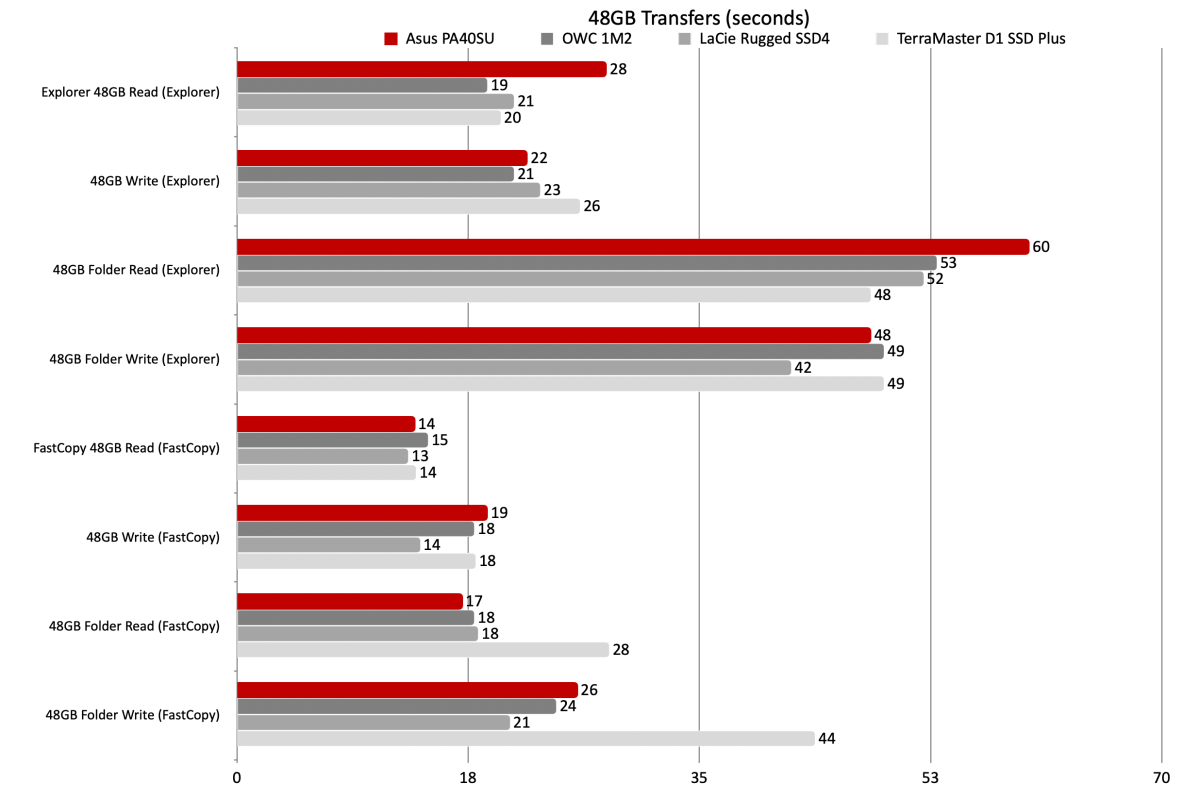
The PA40SU’s 48GB transfers fell a bit behind the curve with Windows Explorer, but rebounded nicely with the highly recommended FastCopy file-transfer utility. If you aren’t using FastCopy for large transfers, you should be.
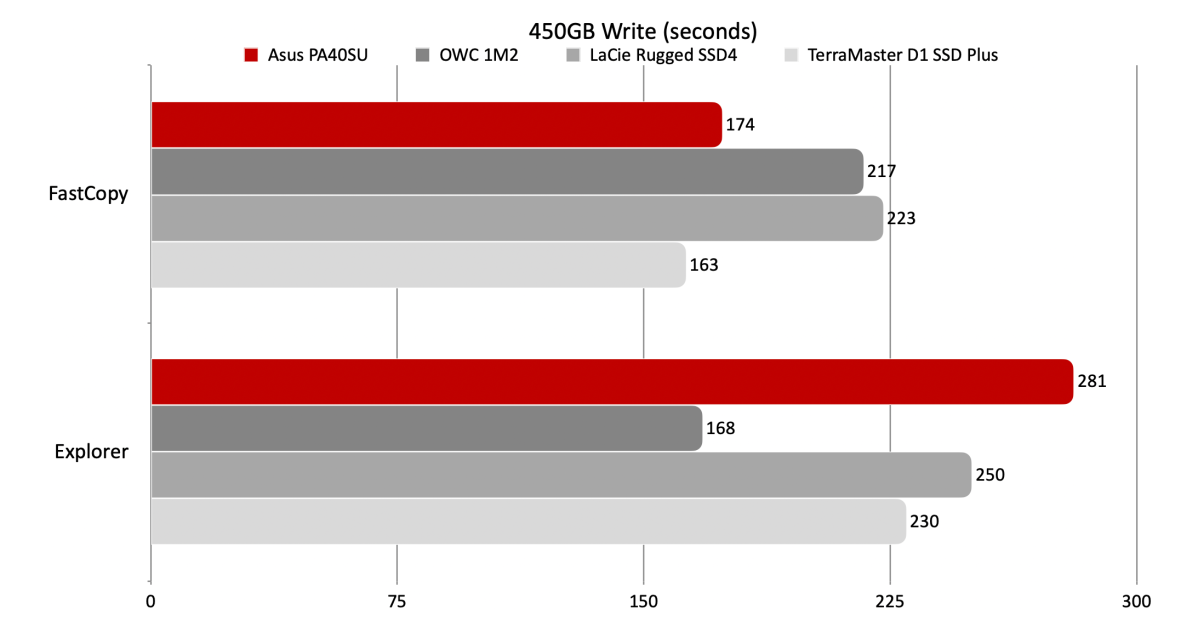
Once again, the PA40SU perked up with FastCopy after a very lackluster 450GB write under Windows Explorer.
Despite the active cooling, the PA40SU ran very warm (one might say hot, at around 140 degrees Fahrenheit) under load. I never noticed any thermal throttling, or even a lot of fan noise for that matter. I opened the heated enclosure to see if the overly quiet fan was indeed spinning — it was. I would prefer the noise of greater air flow for cooler operation. You might prefer it the way it is.
Note that one way to reduce what you might consider excessive heat is to attach any external SSD to a 10/5Gbps USB port. The lower throughput works wonders thermally, to of course, the detriment of performance. Consider this action a last ditch, temporary fix.
Also, any PCIe 4.0 NVMe SSD will give you basically the performance we saw. PCIe 5.0 is massive overkill.
Should you buy the Asus PA40SU?
I like the looks, I like the performance, and I like how easy it is to install an NVMe SSD in the PA40SU. I’d prefer that it run a bit cooler, but it’s still a worthy product. Go for it, but as always — shop carefully to get the best bang for your buck.
How we test
Drive tests currently utilize Windows 11 24H2, 64-bit running off of a PCIe 4.0 Samsung 990 Pro in an Asus Z890-Creator WiFi (PCIe 4.0/5.0) motherboard. The CPU is a Core Ultra i5 225 feeding/fed by two Crucial 64GB DDR5 5600MHz modules (128GB of memory total).
Both 20Gbps USB and Thunderbolt 5 are integrated into the motherboard and Intel CPU/GPU graphics are used. Internal PCIe 5.0 SSDs involved in testing are mounted in an Asus Hyper M.2 x16 Gen5 adapter card sitting in a PCIe 5.0 slot.
We run the CrystalDiskMark 8.04 (and 9), AS SSD 2, and ATTO 4 synthetic benchmarks (to keep article length down, we report only the first) to find the storage device’s potential performance. Then we run a series of 48GB transfer and 450GB write tests using Windows Explorer drag and drop to show what users will see during routine copy operations. The far faster FastCopy (run as administrator) to show what’s actually possible.
A 25GBps two-SSD RAID 0 array on the aforementioned Asus Hyper M.2 x16 Gen5 is used as the second drive in our transfer tests. Formerly the 48GB tests were done with a RAM disk serving that purpose.
Each test is performed on a NTFS-formatted and newly TRIM’d drive so the results are optimal. External drives are set to Best Performance with Write Caching rather than Quick Removal.
Note that in normal use, as a drive fills up, SSD performance may decrease due to less NAND for secondary caching, as well as other factors. This issue has abated somewhat with the current crop of SSDs utilizing more mature controllers and far faster, late-generation NAND.