

Summary created by Smart Answers AI
In summary:
- PCWorld tested productivity laptops with Qualcomm Snapdragon X1E/X2E, Intel Core Ultra 200/300, and AMD Ryzen AI 300 processors using Microsoft 365 applications.
- Intel’s Core Ultra Series 2 (Lunar Lake) emerged as the most efficient processor per watt-hour, excelling in battery life and Office app performance.
- Testing revealed significant productivity differences with larger data sets, showing Intel’s Panther Lake reduces task completion times compared to older Surface Pro models.
When evaluating productivity laptops, two key features that I begin with are office performance and battery life: How well can I work, and how long can I work for?
PCWorld’s list of recommended laptops is already divided up into several categories, for gamers, value shoppers, and so on. And you can find a terrific laptop in that list, reviewed and tested by PCWorld staffers and their colleagues.
Here, though, I’ve taken a different approach. Each processor manufacturer usually sends a representative laptop to reviewers as the best example of what their chips can do. Think of it like a Miss America pageant, but with nerdy white-collar workers competing to claim the productivity crown. I’ve taken most of these laptops, gathered over the past months and years, and put them to the test: specifically in office applications, and running those office applications for as long as possible. My thinking is that before you pick out a laptop to buy, you should know how productive that laptop chip can be.
PCWorld has traditionally tested battery life by downloading and looping a pre-recorded video until the battery expires, but that’s not how people watch movies on their laptops. Instead, here I use a Netflix streaming test with the anime One Piece as a centerpiece. My goal is to find out how representative productivity laptops succeed in an everyday work environment. This test also coincides with the release of the Qualcomm Snapdragon X2 Elite Extreme, which Qualcomm designed for power-efficient, performant work environments.
Mark Hachman / Foundry
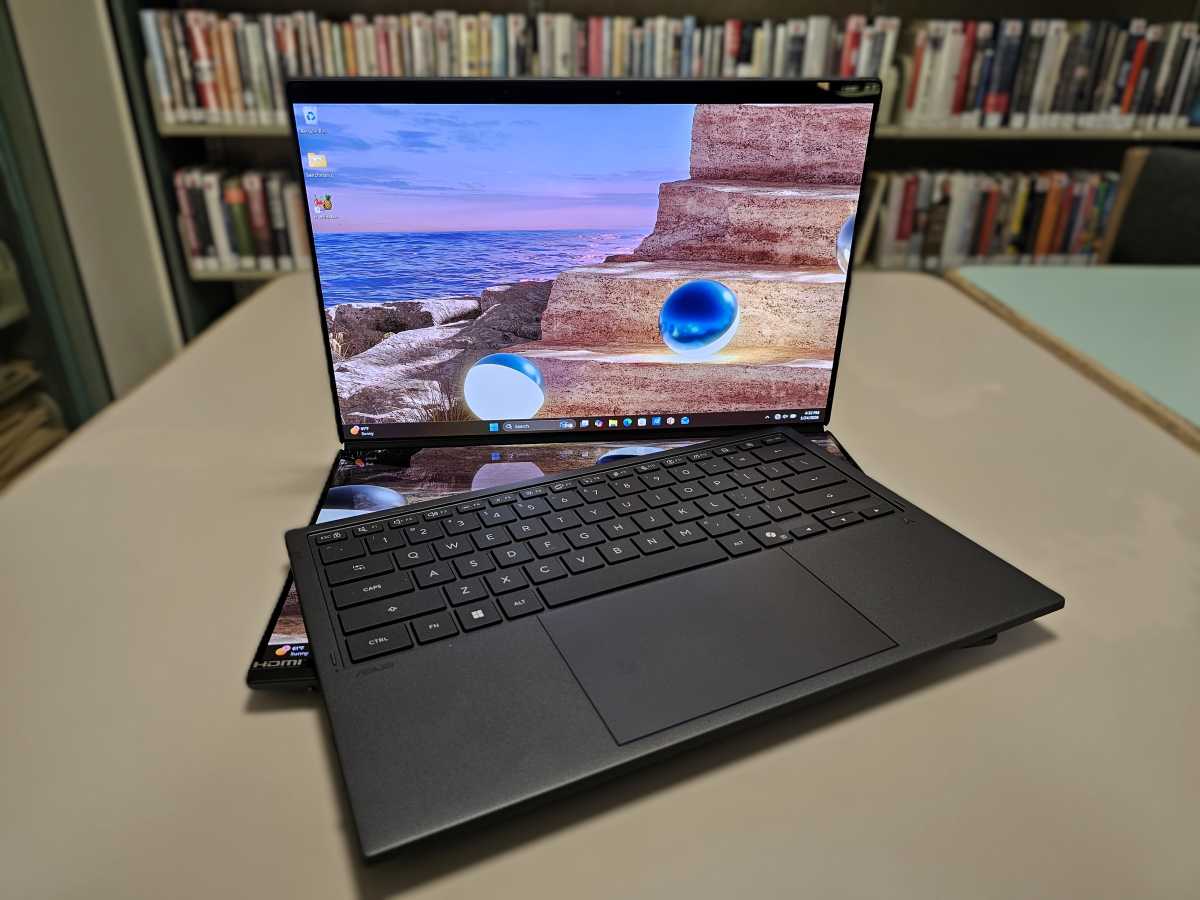
There’s one caveat: On the very last round of testing, after I had compiled days of performance testing and battery tests, the Asus A14 (UX3607O) laptop housing the Qualcomm Snapdragon X2 Elite Extreme chip refused to boot or hold a charge. That doesn’t invalidate my testing, though it might sour you on that particular notebook.
Putting the chips to the test
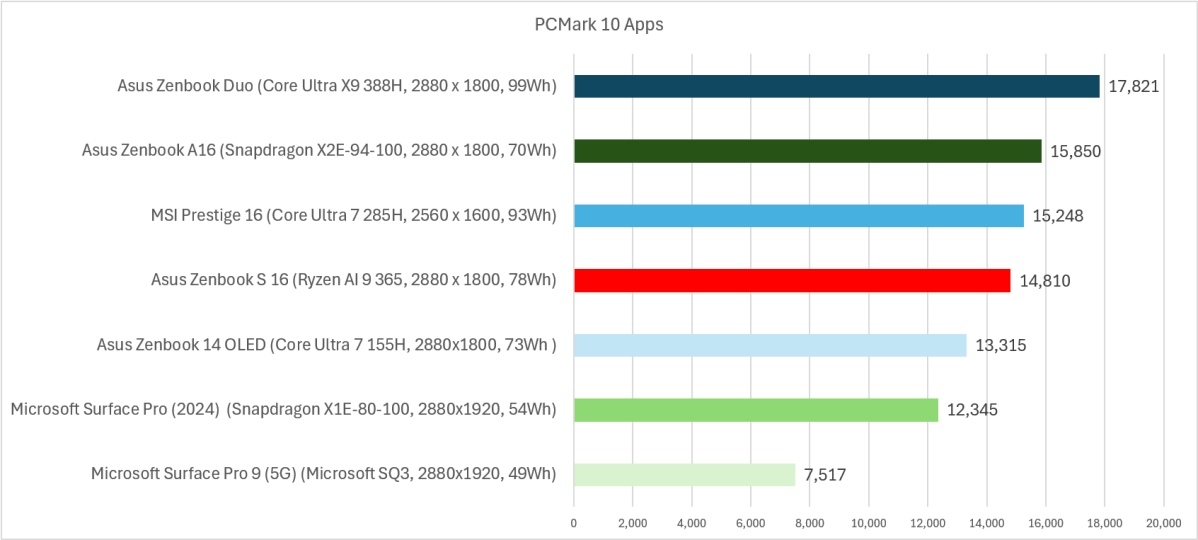
What I want to know is how well each laptop runs the Microsoft 365 / Office apps: Word, PowerPoint, and Excel. Fortunately, two benchmarks from UL do just this. The first, PCMark 10, runs these three apps in a specialized “Apps” test, adding Microsoft Edge’s browsing capabilities to the mix. Its successor, Procyon, swaps Edge for Outlook. Normally, I’d consider the standard PCMark 10 benchmark instead, as it adds specialized applications like CAD and light gaming. But there’s a catch: Some of its tests were (originally) incompatible with Arm processors.
For compatibility’s sake, then, I stuck with the older PCMark Apps test. Procyon, however, also includes a nifty battery rundown test, which simulates the same office work as the battery expires. I only mention it because my testing mentions both.
For this test, I pitted the Microsoft Surface Pro (2024) with a first-generation 4.0GHz Qualcomm Snapdragon X1E-80-100 chip inside against the new Asus A14 (UX3607O) laptop, with a second-gen 4.7GHz Snapdragon X2E-94-100 processor. To represent Intel, I used a Core Ultra 200-series (Lunar Lake) chip inside the MSI Prestige 16 AI Evo, and a Core Ultra 300-series chip (Panther Lake), housed inside the Asus ZenBook Duo (UX8407A). AMD’s representative processor, the Ryzen AI 300, is found within the Asus ZenBook S 16 laptop. I also included two legacy devices, the Microsoft Surface Pro 9 (5G) with the Microsoft-Qualcomm SQ3 Arm chip inside, and the first-gen Core Ultra (Meteor Lake) processor inside the Asus Zenbook 14 OLED.
Which laptop processor is best for office work in 2026?
When we consider Microsoft’s Office apps alone, the data is pretty clear.
Intel’s Core Ultra 300 (Panther Lake) chips outperform everything else by a significant amount, though Qualcomm’s latest Snapdragon X2 Elite makes a valiant effort to overtake it. AMD’s last-generation Ryzen AI 300 processor finishes in the middle of the pack. (Though AMD announced its Ryzen AI 400 processor at CES in January, we have yet to receive a laptop with one inside of it.) The superb graphics capabilities of Intel’s Panther Lake chip doesn’t really meaningfully affect these scores.
Mark Hachman / Foundry
All this test tells you, though, is a number. What does it actually mean in real-world performance?
In certain cases, not that much. PCMark 10’s Apps use “small” document sizes, while the next-gen Procyon tests use larger, more complex files. In PCMark 10, for example, it takes the Surface Pro (2024) about 2 seconds to launch Word; it takes the Asus ZenBook Duo (Panther Lake) about 0.5 seconds. In Excel, it takes the Surface 0.47 seconds to resize the document, versus 0.43 seconds. The difference, under these older tests, is uniformly small.
Procyon’s test suite teaches a different lesson: Modern workers use larger data sets, and the differences in productivity become magnified.
Using Procyon, the Surface Pro exported a test document as a PDF in Word in 18 seconds; it took the Panther Lake machine 11 seconds to compete the same task. Solving a series of test equations took 7.5 seconds on the Surface Pro, and 4.7 seconds on the Panther Lake machine. In Outlook, it took the Pro 8 seconds to search for a specific email, versus about 5 seconds for Panther Lake. Again, these are generally the best and worst performers across these performance tests.
So, yes, these differences may be significant — or maybe they’re not! Remember, all of these little tasks will generally add up during the course of a workday. But whether they’re true annoyances or something that you can live with will vary from user to user.
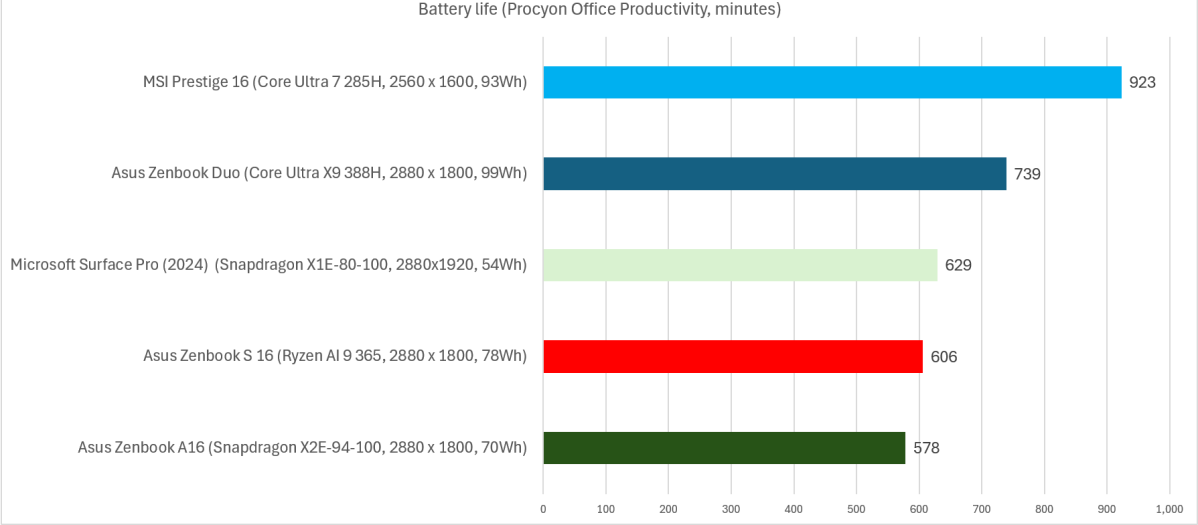
To me, battery life is another critical metric — but again, there are some things to watch out for. A bigger battery allows for a bigger “gas tank” of battery power. Here, I had to winnow down the field somewhat to just include the latest laptop generations that we tested using the UL Procyon benchmark.
Mark Hachman / Foundry
From a battery life perspective, the Core Ultra Series 2 (Lunar Lake) laptop easily outlasted the other competitors. Panther Lake came second — helped significantly by its 99Wh battery. That’s the maximum capacity allowed by the Federal Aviation Administration (FAA) aboard a domestic flight. It also adds to the weight and thickness of the laptop.
Simply attaching a gigantic battery to a laptop, however, doesn’t intrinsically make it more efficient. In a sense, it feels a bit like cheating! Not every Panther Lake laptop will include a 99Wh battery, and there should be a way of checking if a lighter laptop with a smaller battery could be used instead.
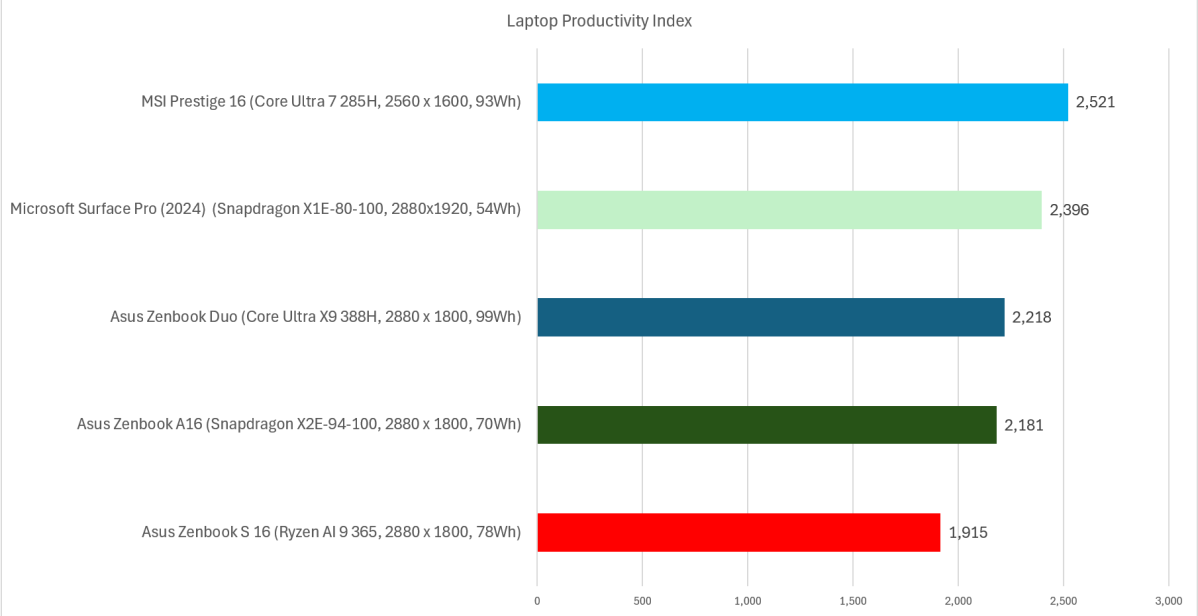
I’ve used an arbitrary “productivity index” to try and reconcile the two. Multiplying the PCMark score by the battery life in hours represents the total “work” done, which can then be divided by the size of the battery in watt-hours. This gives us the total work done per watt-hour of battery life, which tells us what the most efficient laptop processor platform is: Intel’s older Core Ultra 200 chip family, code-named Lunar Lake.
Mark Hachman / Foundry
Some of you may simply want the best performing laptop. Others may simply want the best laptop deals. Both strategies make perfect sense, especially if you’re looking to save money by considering an older laptop. And you should! My tests show that Intel’s older Core 200 and the last-gen Snapdragon X1 Elite are the most efficient laptops in terms of prolonged performance, even if the newer models outperform them.
Either way, I hope you start thinking about productivity laptops the way I do: not just as a collection of numbers, but in terms of real-world value for what they can do and for how long!