

Summary created by Smart Answers AI
In summary:
- PCWorld details how Claude Cowork, an AI desktop application, can automatically manage Gmail overload by identifying and unsubscribing from unwanted newsletters.
- Claude successfully unsubscribed from 21 newsletters in just five minutes using a custom JavaScript function through its Chrome extension.
- The AI can track unsubscribed emails and mark any re-appearing messages as spam, providing ongoing email management beyond initial cleanup.
I’m in the midst of an experiment where I let Claude take charge of my Gmail inbox, allowing it to triage my messages, archive marketing emails, and even draft replies when needed. But while Claude was doing a good job of sifting through my messages, it wasn’t cutting down on the sheer volume of email I was receiving. Then my wife had a clever idea.
I’d been explaining how I’d set Claude Cowork to label the random newsletters I receive (several of which I don’t remember ever having signed up for) as “Archiveable” and then removing the “Inbox” label, allowing me to sort through those messages later. My wife nodded, and then mused that it’s a shame Claude couldn’t just unsubscribe me from those unwanted emails, too.
But wait, I replied: Maybe… it can?
The beauty of Claude Cowork, the desktop application feature that lets it perform tasks directly on your system, is that it allows a greater range of creativity than it would have when confined to a chatbox. (Claude Cowork requires a paid Claude subscription; I’m signed up for Claude Pro, which costs $20 a month.) And as we all know, creativity is often required when it comes to unsubscribing from newsletters, especially the more annoying ones.
Now, unsubbing from any one email newsletter is no big deal. “Unsubscribe” links are generally easy to find, and Gmail has its own built-in unsubscribe tool. But if you have dozens of newsletters to deal with, getting help from Claude or another AI agent starts sounding a lot more appealing.
Going into my Cowork “Morning Gmail triage” project (I’d previously enabled the Gmail connector for Claude), I asked:
Looking at the emails in my “archivable” label, which ones are newsletters, and which ones could I safely unsubscribe from? Give me a list but don’t actually do it yet.
Claude thought for a few minutes (I used the middle-of-the-road Claude Sonnet model for this task, while Claude Opus wrote my initial Gmail triage automation), and then dutifully came back with two main groups of newsletters: editorial newsletters (like the New York Times Cooking email, which I almost never read – sorry, New York Times!), and brand and retail newsletters (including the ones you get signed up for when you create a user account). It also flagged recurring emails (like one from NYC Schools) that I should probably keep.
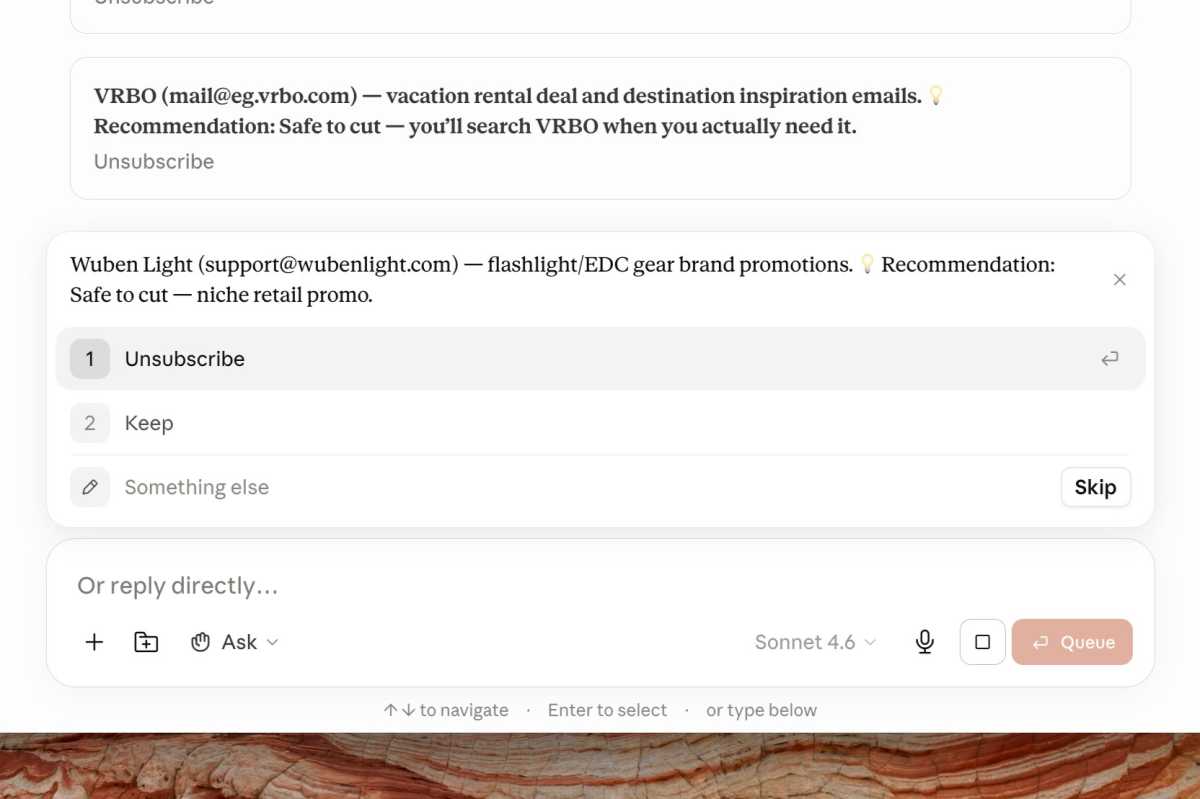
Claude walked me through each of my email subscriptions, recommending which ones were safe to cut.
Ben Patterson/Foundry
At this point I could have asked Claude to unsubscribe me from, say, all the marketing newsletters in one shot. Instead, I directed it to ask me about each newsletter, one at a time, in multiple-choice format, along with its own recommendation about whether I should unsubscribe or not.
Claude began plowing through the list, asking me about each newsletter. It suggested I keep the Film at Lincoln Center newsletter for New York Film Festival updates, for example (I did sign up for that one), but advised nixing Rotten Tomatoes (“low-value listicle content, nothing you can’t get by checking the site”).
When I was done, Claude got ready for the bulk unsubscribe task, which it would perform using the Claude extension for Chrome. Even better, it wrote itself a JavaScript function that allowed it to quickly find and click the “Unsubscribe” button in Gmail, all without thrashing around in a browser window (and wasting AI tokens in the process).
Roughly five minutes later, Claude was done — 21 unwanted newsletters, 21 unsubscribes. It even suggested a follow-up routine where it would keep track of the newsletters I’d unsubscribed from and mark them as spam if they ever reappeared.
Pretty nice, and a great example of AI taking a tiresome chore off my plate.